React Mentions: @People and #Tags That Survive Renames
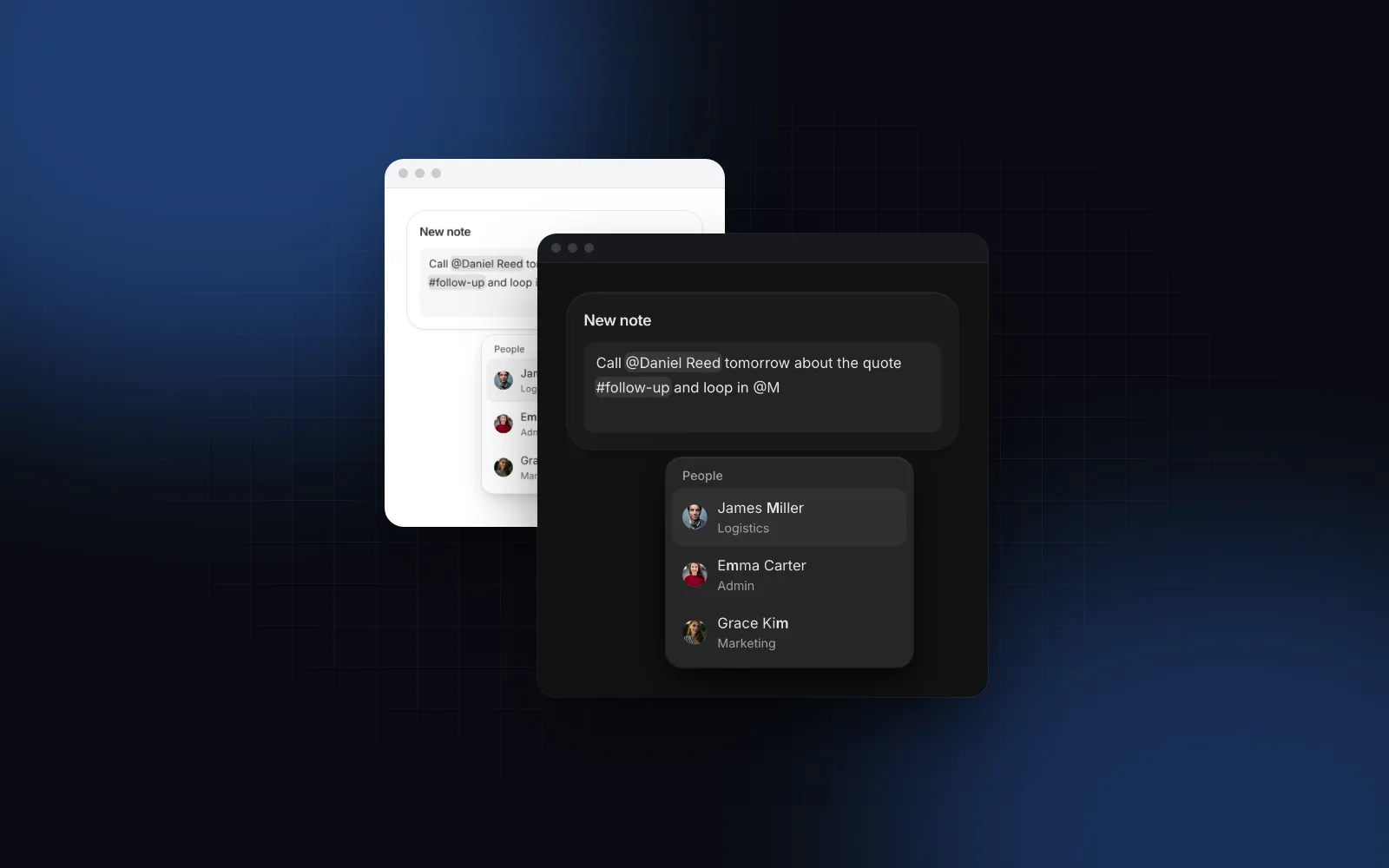
React mentions look simple: type @, pick a name, show a chip. The trouble starts later. Someone gets renamed and old comments still say the old name, or stop notifying anyone. Two people named Alex collide. On a phone the suggestion list opens under the keyboard, or tapping a name closes the keyboard and loses the caret. This guide covers how to store @mentions and #tags so they survive renames, how to place suggestions at the caret on desktop and on touch, and the props that matter in the Wingo UI Mention Input.
What should a React mentions component handle?
Five things: a stable storage format, suggestions anchored to where you type, chips that behave as one piece, a phone layout that keeps the keyboard open, and screen reader output.
- Markup with ids. The stored value carries the id of every mention, so the text can change and the reference still holds.
- Suggestions at the caret. The list opens next to the @ you just typed, filters as you type and allows spaces, so "Daniel Re" still matches.
- Atomic chips. Backspace after a chip removes all of it, arrow keys step over it, and the caret never lands inside it.
- Phones. 16px text so iOS does not zoom, 44px rows, and a list that stays visible above the on-screen keyboard.
- Accessibility. The field announces the highlighted suggestion and says when a mention was added or removed.
How do I store mentions so they survive renames?
Store markup that holds both the label and the id: @[Daniel Reed](u-daniel) for a person and #[follow-up](t-follow-up) for a tag. The id is the reference. The label is a snapshot of the name at the time of writing, kept so the text reads well without a lookup.
The common shortcut is to store plain text such as "@Daniel Reed" and match names when you render. That breaks the day Daniel changes his display name: the old mentions no longer match anyone, so they render as plain text and your notification query misses them. It also cannot tell two people with the same name apart.
The Wingo UI Mention Input stores exactly this markup. Its helpers work on any stored value:
getMentions(value)returns every mention with{ trigger, id, label, start, end }, the offsets in the plain text.mentionsToText(value)returns what people read ("Call @Daniel Reed tomorrow"), for email bodies, previews and search indexes.parseMentionMarkup(value)andserializeMentionSegments(segments)split the markup into text and mention segments and join them back, escaping anything that only looks like markup.
When you want old notes to show current names, rewrite the labels from the ids before you render:
A mention of someone who left the company keeps the label it was written with, which is usually what you want in an audit trail. MentionText renders a stored value read-only with the same chips, and highlightIds gives your own mentions the brand tone so people spot them in a long history.
If you are moving off the react-mentions package, the default markup there is @[__display__](__id__), the same shape for the @ trigger, according to its README (opens in a new tab). Stored values that kept that default parse as they are, unless a name or id contains a bracket, a parenthesis or a backslash: the Mention Input escapes those with \, react-mentions does not. Values written with a custom markup template, or # mentions saved in the @ shape, need a one-time migration.
What props does a React mentions textarea need?
Two lists and a value. people sets up the @ trigger, tags the # trigger, and value with onValueChange keeps the markup in your state. onValueChange also receives { text, mentions }, so you never parse the value twice.
⌘ Enter (Ctrl Enter elsewhere) runs onSubmit, and a returned promise locks the field until it settles, so a slow request cannot be sent twice. Check on the server that every id in notify belongs to someone allowed to see the record before you send anything. The helpers live in a "use client" file, so call them in the browser, as above, and send the results along with the markup.
The props you will change next: multiline={false} for a single-line task title, minRows and maxRows for the growing textarea, maxLength for a counter that counts a chip as its visible text, submitShortcut="enter" for a chat-style box, and name for a hidden input that posts the markup in a plain form.
Type @ and a few letters, then # and a tag that does not exist yet. Save the note and it appears below, rendered with MentionText.
$ npx wingo-ui@latest add mention-inputHow do #tags and custom triggers work?
The # trigger works the same way as @, with one addition: when nothing matches exactly, the last row offers "Create #partnership". The created tag is inserted and offered again later. Turn that off with allowCreateTags={false}, or pass a triggers entry with your own onCreate to save the tag before it is inserted. Existing tags autocomplete and new ones are created inline, so you do not need the separate hashtag input React apps tend to add next to a mention field.
For anything else, define a trigger. char is one symbol or punctuation character, items is a static list, and onSearch loads results for the query, debounced 200ms, with stale answers dropped:
A triggers entry for @ or # merges with people and tags field by field, so { char: "@", tone: "info" } recolors the chips and keeps the people list. If you need tags as a separate field of chips instead of words inside a sentence, the Tag Input is the better fit, covered in the React tag input guide.
What should an @mention input react to on a phone?
Three things: the keyboard, the finger and the zoom. The Mention Input keeps a real textarea as the control and draws the chips in a highlighter layer behind it, so the browser still handles autocorrect, dictation and IME composition. A text field with fewer than 16px makes iOS zoom in on focus, so the text is 16px on phones whatever the size.
With a mouse, the list opens at the caret and is portaled above everything, so no card or dialog cuts it off. On touch it attaches to the edge of the box instead, a stable spot that does not move with every new line. It flips above the box when the keyboard would cover the room below. Rows are at least 44px tall, and a tap inserts without the field losing focus, so the keyboard stays open and the caret lands after the chip. If you are fighting the keyboard elsewhere on the page, the iOS Safari keyboard guide explains the viewport behind it.
suggestionsPlacement overrides the automatic choice with "caret", "below" or "above".
How do I make React mentions accessible?
A screen reader should hear the text as people read it, the suggestion that is highlighted, and every change. The textarea keeps its native textbox role and points at the list with aria-haspopup, aria-controls and aria-activedescendant; the single-line version is a combobox. The value read aloud is the plain text ("@Daniel Reed"), never the markup. Up and Down move through the list, Enter or Tab inserts, Escape closes the list before it closes a surrounding dialog, and a live region says "Daniel Reed mentioned", "Daniel Reed removed" or "No matches". Every string sits in labels, with English defaults in DEFAULT_MENTION_INPUT_LABELS. Keyboard handling for the list itself follows the same rules as the React combobox guide.
Should I use react-mentions, a rich text editor or the Mention Input?
It depends on what the text is. Facts below are from each project's public docs and npm, as of October 2026.
If react-mentions already works for you, you may not need a react mentions alternative at all. Switch when you want styles that follow your design tokens, touch placement or # create rows without writing them yourself; the @ markup is compatible, so stored values carry over. Pick a rich text editor when people need headings, lists and links. The Wingo UI Rich Text Editor is built on Tiptap and turns on @mentions with a mentions={{ items }} prop, where picked people become chips with a data-id in the saved HTML.
When should I use the Comment Thread instead?
Use it when the mentions live in a discussion with replies, reactions, edit and delete. The Comment Thread has its own composer with @ suggestions and passes the mentioned ids to onSubmit as { mentions }. Note one difference: its bodies are plain text with "@Name", matched against the people you pass, so a renamed person's old mentions turn back into plain text. That is fine for short-lived threads. For notes you keep for years, store the Mention Input markup and render it with MentionText.
$ npx wingo-ui@latest add comment-threadWhat are the common pitfalls with React mentions?
- Storing names instead of ids. Renames and duplicate names break notifications. Store the id.
- Notifying from the client only. Send the ids, then check on the server who may be notified.
- Rendering stored markup as HTML.
MentionTextrenders text nodes and chips, never HTML, so a label with angle brackets stays text. - A list hidden behind the next section. On touch the list renders in flow against the box so it scrolls with the field. Clipping parents such as an overflow-hidden card or a sheet body are handled: when they leave too little room, the list is portaled. A parent that only isolates (for example with
isolate) without clipping needsz-dropdown, or the list paints under what follows.
How do I add it to my project?
Run npx wingo-ui@latest add mention-input. The CLI copies the source into components/ui, adds the Wingo UI items it imports (Field, Listbox, Avatar, Spinner, four hooks and the shared helpers in lib), and installs the motion package. The Mention Input is a Pro component (pricing). More single-component deep dives are in the component guides category, and the React form components guide covers the label, hint and error anatomy this field shares with every other input.
FAQ
What is the best react-mentions alternative?
Pick by what you store. For plain text with mention chips, a textarea-based component such as react-mentions or the Wingo UI Mention Input fits; for formatted documents, a rich text editor with a mention extension, such as Tiptap, fits better. Check the last release date and how the list behaves on a phone before you commit.
How should I store mentions in the database?
Store the markup string with an id for every mention, for example @Daniel Reed, and save the mentioned ids in a separate column or table if you need to query who was mentioned. Never store only the display name, because names change and two people can share one.
Is react-mentions still maintained?
As of October 2026 the latest react-mentions release on npm is 4.4.10, published on June 30, 2023. Its peer range (react >=16.8.3) accepts React 19, but with no release since 2023, plan to fix new issues yourself.
How do I add #hashtags to a React textarea?
Add a second trigger for # with its own list of tags. In the Wingo UI Mention Input the tags prop does this, and when nothing matches exactly the list offers Create #tag so people can add new ones as they type.
Is the Wingo UI Mention Input free?
No. The Mention Input, the Comment Thread and the Rich Text Editor are Pro components. The Field, Listbox and Avatar it builds on are free.
- Mentions
- Forms
- Mobile UI
- Accessibility
- React