React GitHub Contribution Graph: Data, Themes and A11y
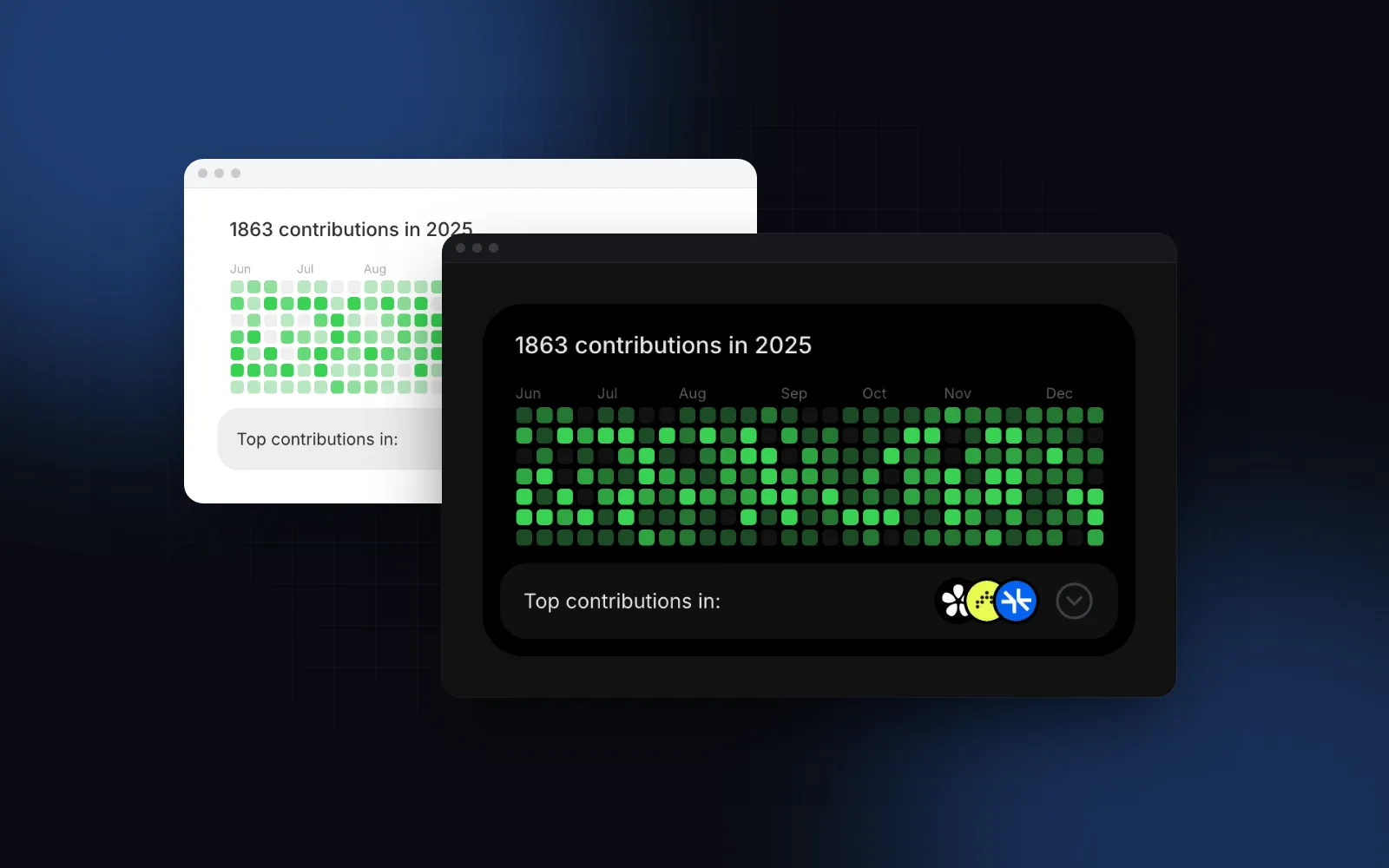
You want a React GitHub contribution graph on a portfolio, an "about" page or a developer profile: the familiar grid of green squares, one per day, with the yearly total on top. Or you want the same shape for your own data, like orders per day, team activity in a CRM or workout streaks. The first case is mostly about where the data comes from. The second is about scales, labels and keyboard access, because a grid of colored squares tells a screen reader nothing. This guide covers both with two Wingo UI components: the free GitHub Activity and the Pro Heatmap Calendar.
Which React contribution graph packages exist?
Three established npm packages draw this grid: react-activity-calendar, react-github-calendar and react-calendar-heatmap, all MIT licensed. Versions are from the npm registry as of October 19, 2026.
None of the three READMEs mentions keyboard navigation or screen reader output (checked October 19, 2026). If you want a packaged widget and can live with that, react-activity-calendar is the most complete. If you want source you can edit, with the same props, theming and motion as the rest of your UI, the two components below install into components/ui.
How do I add a GitHub contribution graph React component?
Install GitHub Activity with the CLI and pass it a GitHub username:
With a username, the component loads two things in the browser. The calendar comes from github-contributions-api (opens in a new tab), a free service that reads the public profile page; its README says results are cached for one hour and uncached requests are limited to 10 per 10 seconds per IP. The top repositories in the footer come from GitHub's public events endpoint, which only returns events from the past 30 days and at most 300 of them (opens in a new tab), and unauthenticated REST calls are limited to 60 requests per hour (opens in a new tab). Fine for a personal page; for anything with traffic, fetch on the server (next section).
An invalid or unknown login shows "No public activity found for {login}" (the notFoundLabel template, with the login filled in) and calls onError, so you can fall back to stored data.
The demo below uses the sample year that ships with the docs, so no request goes to GitHub.
$ npx wingo-ui@latest add github-activityHow do I render the contribution graph on the server?
Fetch the calendar from GitHub's GraphQL API in a server component and pass it as contributions. When you pass the data and no username, nothing is fetched in the browser, the token stays on the server, and the first HTML already has the right total. The GraphQL reference (opens in a new tab) describes contributionCalendar.weeks[].contributionDays[] with a date, a contributionCount and a contributionLevel from NONE to FOURTH_QUARTILE; without from and to, the collection covers the last year.
Two details. Caching is opt-in in Next.js 16, and cache: "force-cache" is what caches a POST that sends an authorization header (fetch docs (opens in a new tab)); revalidate: 3600 caps the cached copy at one hour. And the heading reads "{count} contributions in {year}" by default, with the year of the newest day; for a rolling window, yearLabel="in the last year" is more accurate. Pass repos as { name, count, href?, logo? }[] if you want the footer panel too.
How do I theme the contribution colors for light and dark mode?
Pass the colors through accent, as one color or an array of shades. One color (#39d353 by default) is drawn at 30%, 52%, 76% and 100% opacity over an empty cell that is the foreground at 8%, so the same value works on the white card in light mode and the black card in dark mode. An array of four shades sets each level exactly, and five shades also replace the empty color:
Those four greens are tuned for a dark background. If your shades differ per theme, pass CSS variables and define them for each theme in your stylesheet, for example accent={["var(--commit-1)", "var(--commit-2)", "var(--commit-3)", "var(--commit-4)"]}. The Tailwind v4 dark mode guide shows where those variables go. background, radius, cellSize (11px), cellRadius (3px) and chevronColor cover the rest of the look.
On a phone, the grid shows as many recent weeks as fit the card's width and drops older ones, so it never scrolls sideways. months caps the history, and a max-w-* class shows fewer weeks on purpose.
When do I need a general activity heatmap in React?
As soon as the data is yours. A GitHub graph assumes the levels are already computed and the reader only needs a feel for the year. A dashboard tile with orders, invoices or support tickets per day needs more: your own thresholds, your own nouns in the labels, a selected day that drives a list, and real numbers for people who cannot see the colors. That is the job of an activity heatmap react component like the Heatmap Calendar.
data is one { date, value } per ISO day; missing days count as 0 and duplicate dates add up. Without thresholds, the levels come from quantiles of the non-zero values, so any activity is at least level 1. endDate defaults to the newest date in your data, never the clock, so the server and the browser draw the same grid. weekStartsOn follows the locale (Sunday in en-US, Monday in en-GB) unless you set it.
$ npx wingo-ui@latest add heatmap-calendarHow do I make a react calendar heatmap accessible?
Make every number available without color. WCAG success criterion 1.4.1 Use of Color (opens in a new tab) asks that color is not the only way information is conveyed, and a heatmap is exactly that by default. In 2018 Adrian Roselli reviewed GitHub's contributions chart (opens in a new tab), found it unusable by keyboard and invisible to screen readers, and argued the data belongs in a table. GitHub fixed its own graph in March 2023 (opens in a new tab): arrow keys move between days, and a screen reader hears the graph as a table and a summary of each day.
The Heatmap Calendar follows the same model:
- One Tab stop. Tab lands on the selected day or the newest one. Left and Right move by a week, Up and Down by a day, Home and End jump to the first and last day, PageUp and PageDown move four weeks, Enter or Space selects, Escape clears.
- A spoken label per day from
labels.cellandlabels.empty, such as "42 minutes on Thursday, September 24, 2026" inen-US, with the date written out for your locale. - A screen reader table with each month's total and active days, captioned by
label.descriptionadds a one-sentence takeaway. - A scale that reads in both themes. Level 0 is the foreground at 7%, visible on white and on the dark surface. The other levels are one hue from 30% to 100% in equal steps, so the order is carried by lightness. Set
tone, or any CSS color withcolor, andemptyColorfor the empty days.
GitHub Activity is lighter here. Its grid is one image named after the heading ("1234 contributions in the last year"), and the per-day tooltip answers hover and touch, not the keyboard. That suits a decorative profile card. When the daily numbers matter, use the Heatmap Calendar.
How does the heatmap behave on a phone?
On a phone, the Heatmap Calendar either scrolls the year as a horizontal rail or shows only the weeks that fit, depending on overflow. overflow="scroll" (the default) turns the year into a horizontal rail that opens at the newest week, snaps by week, fades at the edges and keeps the weekday labels pinned; vertical drags still scroll the page. overflow="fit" shows only the newest weeks that fit, with nothing to scroll.
Touch has its own rules: the first tap on a day pins its readout above the grid (so a finger never covers it), a second tap on the same day selects it, and a tap outside clears it. tooltipMode defaults to "auto", which uses that fixed readout on touch screens and a floating one next to the day elsewhere. The intro sweep and the color crossfade respect reduced motion, as explained in the prefers-reduced-motion guide.
What are the common contribution graph pitfalls?
These four break a contribution graph in ways that are easy to miss in development:
- Data that does not start on a Sunday. GitHub Activity draws one column per seven entries of the
contributionsyou pass, and only trims its own fetched data. Start the array on a Sunday or every column shears. The server example above trims the first partial week. - Calling GitHub from every visitor's browser. The free APIs have per-IP limits and the events endpoint only covers 30 days. Fetch on the server and cache it.
- Reading "today" during render. The Heatmap Calendar reads the viewer's date only after hydration for the today ring and uses your data for
endDate. Keep it that way in your own wrappers, or the server and client grids disagree. - A heatmap as the only view of a KPI. Pair it with a number: a Stat Card for the total or a Sparkline for the trend. The dashboard library comparison covers the rest of a dashboard.
How do I add these to my project?
Run npx wingo-ui@latest add github-activity for the free contribution graph, or npx wingo-ui@latest add heatmap-calendar for the general heatmap (Pro, see pricing). The CLI copies the source into components/ui and adds what it imports. More single-component deep dives live in the component guides category, and the React form components guide applies the same keyboard and screen reader rules to every field.
FAQ
How do I show my GitHub contribution graph in React?
Install a component that draws the yearly grid and give it either a username or the daily data. With Wingo UI, loads the last year in the browser, or you fetch the calendar on the server with the GitHub GraphQL API and pass it as contributions.
Where does contribution graph data come from?
GitHub's GraphQL API exposes it as user.contributionsCollection.contributionCalendar, with a count and a level for each day; it needs a token. Without a token, react-github-calendar and the Wingo UI component's username mode call the free github-contributions-api, which reads the public profile page and caches results for one hour.
What is the difference between a contribution graph and a calendar heatmap?
A contribution graph is a calendar heatmap with GitHub's data and look: weeks as columns, days as rows, five shades of green. A general react calendar heatmap takes any daily value, such as orders or minutes, and lets you choose the scale, the colors and the labels.
Is a heatmap calendar accessible?
Only if the numbers are available without color. Give each day a text label, make the grid reachable by keyboard, and offer a table or a summary for screen readers, which is what GitHub added to its own graph in March 2023.
Is the Wingo UI GitHub Activity free?
Yes. GitHub Activity is in the free tier and installs with npx wingo-ui@latest add github-activity. The Heatmap Calendar is a Pro component.
- Charts
- Heatmap
- GitHub
- Accessibility
- React