Nextjs Status Page: 90-Day Uptime Bars and Incidents
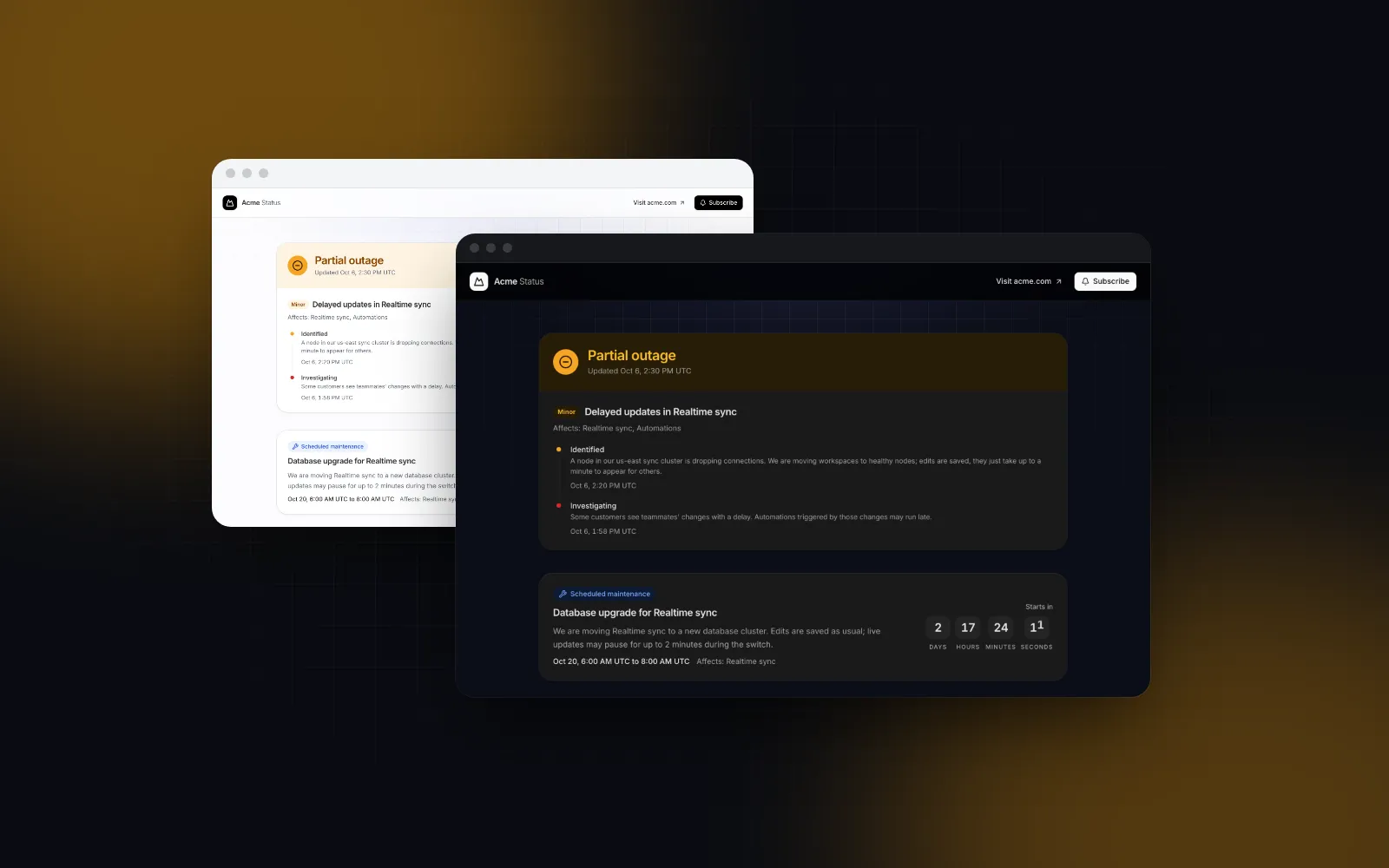
A status page sounds like a weekend job until you list what it has to do: sum up every service in one banner, draw 90 days of uptime bars per component, post incident updates in order, count down to maintenance, keep a history, and stay up while your app is down. This tutorial builds a nextjs status page in the App Router, fed by your own monitoring data instead of a hosted vendor. The UI is our Status Page template, so we are not neutral, but the data model, the uptime math and the caching work the same with any react status page you build yourself.
What belongs on a public status page?
A public status page needs six parts, and the big hosted products have trained visitors to look for all of them:
- An overall banner. "All systems operational" in green, amber for degraded or partial, red for a major outage, blue for maintenance. The worst component decides it.
- Components with uptime bars. One row per thing customers use (API, web app, webhooks), each with a bar of daily blocks. Atlassian Statuspage's uptime showcase (opens in a new tab) (as of October 2026) shows the past 90 days, shades each day from green through yellow and orange to red as downtime reaches 60 minutes, and paints days without data gray. OpenStatus (opens in a new tab) went shorter: since June 24, 2026 each page picks 30 or 45 days.
- Open incidents with their updates. Investigating, identified, monitoring, resolved, newest first, each with a time.
- Scheduled maintenance. What, when and which components.
- An incident history page. Past incidents grouped by day, so "was it you or us last Tuesday?" has an answer.
- A way to subscribe. Email, RSS, webhooks, a calendar for maintenance.
Most "status page template" results we found are either full self-hosted products (a database, an admin, a monitor) or a static mockup with hardcoded bars. The hard part sits between those: turning raw checks into honest daily numbers and getting them onto a page that stays fast and fresh. That gets most of the space here.
How do you install the status page template?
One CLI command copies the template and everything it imports. The template is a Pro item, so the account behind the CLI needs Wingo UI Pro.
The CLI copies components/templates/status-page.tsx and status-page-data.ts into your project, plus what they use, including the Tracker for the uptime bars, the Timeline for incident updates, the Countdown for maintenance and the Popover for the subscribe form. With no data props it renders one of three sample data sets, picked by simulate (operational, degraded or outage), which is handy for a first look.
$ npx wingo-ui@latest add status-pageWhat data does a Next.js status page need?
It needs four data props, all typed in status-page-data.ts; copy and links come separately through labels and hrefs.
A day in a component's history is a StatusDay: { date, status, uptime, note? }, where status is ok, degraded, down, maintenance or none, and uptime is a percentage from 0 to 100. An incident stays open until its newest update has the stage resolved. A maintenance window disappears once endsAt has passed.
One detail will bite you on day one: when groups, incidents or maintenance is left out, the template falls back to its sample data for that prop. Always pass an array, even an empty one. An updatedAt that does not parse as a date falls back to the sample's date too.
How do you turn monitoring checks into daily uptime bars?
Your monitor (a hosted pinger, a cron job, a health check in your own worker) produces check results. The status page wants one row per component per day. Do that rollup once, in a scheduled job or a SQL view, and store the minutes:
This is a policy, and you should pick yours on purpose. Ours: down minutes count fully, degraded minutes color the block amber but do not lower the percentage, and maintenance is excluded. Atlassian makes a different call: its docs (checked October 2026) say partial outages count at 30% of a major outage, and degraded performance and maintenance do not count at all. If you want that, add a partial minutes column to DayMinutes and compute the uptime from measured - down - partial * 0.3. Whatever you choose, publish the rule next to the bars (the componentsDescription label is a good place) so customers can check your math.
Two more rules keep the bars honest. Roll up in UTC, because the template renders every time in its timeZone prop, which defaults to UTC so the server and the browser print the same thing. And notice that a none day carries uptime: 100: the row's average counts every day it is given, so a component added last week would show a perfect 90-day figure. Trim each history to the day the component went live, as the route below does with createdAt; Atlassian handles the same problem with a start date per component, which defaults to the day the component was added.
How do you build the status route in the App Router?
Split it in two: a server component that loads and maps the data, and a small client wrapper that owns everything that cannot cross the server boundary. The template is a client component, and linkComponent and onSubscribe are functions, so they belong in the wrapper. The data crosses as plain JSON.
export const revalidate = 60 keeps the page static and regenerates it at most once a minute. That matters for the moment you care about most: during an outage your status page gets its biggest traffic, and a static page served from the cache does not add load to a database that is already struggling. The Next.js ISR guide (opens in a new tab) also says that if a revalidation throws, the last successfully generated data keeps being served, so a failing query shows slightly old data instead of an error.
If your project turns on cacheComponents, a revalidate export becomes a build error. Move the whole load into one async function that starts with "use cache" and calls cacheLife("minutes") (that profile revalidates after one minute), and compute today and updatedAt inside it too: Cache Components fails the prerender on a bare new Date() outside a cached scope.
Two things to check before launch:
onSubscribeis wired. Without it the signup form waits 900 ms and reports success, which is right for a demo and wrong for customers. A returned promise keeps the button spinning, and a rejection shows the error.- The default links exist.
hrefspoints at/status/history,/status/feed.rss,/status/maintenance.icsand/docs/webhooks. Build those routes or override the links.
How do you refresh the page the moment an incident changes?
One minute is fine for the bars. It is too slow for "Investigating" on a fresh outage. Point your monitor's or incident tool's webhook at a route handler that revalidates the page:
Called from a route handler, revalidatePath marks the page stale and the next visit renders it fresh. Revalidate /status/history the same way when you resolve an incident.
How do incidents, maintenance and the banner work together?
You never set the banner by hand. overall defaults to "auto", which runs the exported deriveOverall(groups): the worst component state wins, in the order major, partial, degraded, maintenance, operational. Keep each component's state in sync with reality and the banner follows. Set overall explicitly only for the rare case your data cannot express, such as a planned full-platform window.
An open incident renders inside the banner with its updates as a timeline, newest first. Store updates as rows with a stage, a message and an at time, and post a new one whenever something changes; isIncidentOpen(incident) is true until the newest update says resolved. Each incident lists the component ids it affects, which is how the page names them.
Maintenance windows count down to startsAt, then to endsAt while they run, and vanish afterward. The server renders every window as upcoming and the clock is only read after hydration, then every 30 seconds, so a static page never causes a hydration mismatch. The flip side: a window that ended after the last regeneration still sits in the cached HTML as "Scheduled maintenance" until the page hydrates. That is why the route filters ended windows before passing them, and why it is worth a revalidatePath when a window closes.
Below the components, the incident history lists the last historyDays days (7 by default), with "No incidents reported" on quiet days. That covers the common question. Link hrefs.history to a full incident history page that renders the same template with historyDays={30} (and a historyDescription label that says "the last 30 days"), or a plain list of every incident by month.
How do uptime bars behave on phones and keyboards?
This is where a status page made of divs usually falls apart. Ninety blocks across a 390px screen leave each block under 3px wide once the gaps are taken out: impossible to tap and hard to read. The template renders two trackers per component and lets CSS pick: 90 days from 768px up, the last 30 below, each with its own average. The switch is a media query (md:hidden and max-md:hidden), so the server HTML is already right and nothing jumps after hydration, which a useIsMobile check cannot promise (we explain why in our post on the React use mobile hook).
On touch, the whole bar is the target. A tap pins a readout with the date, the uptime and the note, a sideways drag scrubs through the days while a vertical drag still scrolls the page, a second tap on the same block fires onBlockClick, and a tap outside clears it. With a keyboard, Tab lands on the newest block, the arrow keys walk the days, Home and End jump to the ends, PageUp and PageDown move by ten, Enter or Space fires onBlockClick, and a polite live region reads each day. Screen readers also get a summary of the counts per status and a table of every block.
You can use the Tracker on its own, which is where most "uptime bars react" searches end up: an internal dashboard card, a sync health row, an integration's last 30 runs. Alone it handles narrow screens differently: fit="latest" (the default) keeps only the newest blocks that fit at minBlockWidth (4px) and moves the start caption to match. The template pins exact 90 and 30 day windows instead, so the average printed above the bar always covers a known span.
Each datum is { status, id?, date?, label?, description? }, and statuses merges over the defaults (ok, degraded, down, maintenance, none), so a key you invent like partial gets its own label and tone. A status with no entry draws as none and logs a warning in development.
$ npx wingo-ui@latest add trackerWhere should you host a status page?
Host it on a separate deployment, provider and domain from the app it reports on. On April 8, 2021, Facebook's status page appears to have run on the same infrastructure as the services that failed, and Statuspal's write-up of that outage (opens in a new tab) recommends a separate infrastructure, data center, hosting provider and domain for anything self-hosted. Statuspal sells status pages, so weigh the advice accordingly, but the logic holds on its own.
For a Next.js status page, that means three things:
- A separate deployment. Its own project, not a route in your main app. A bad deploy or a crashed app server should not take it down.
- Data that does not depend on the app's database. Let the monitor write rollups and incidents to a small store the status project reads, or push them to it. If the page can only render by querying the database that just failed, your cache is the only thing standing between you and a blank page.
- Monitoring from outside. Checks that run inside the system they test go silent with it.
If you also want the status inside your app (a banner in the dashboard during an incident), read the same data from the status project's JSON instead of keeping a second source of truth. For the app side, our Next.js admin dashboard tutorial builds the shell, tables and settings around it, and more screens like this one live in the Build it category.
What is the next step?
Install the template, render it with sample data, then swap in your rollups one prop at a time: groups first, then incidents, then maintenance.
The Status Page template and the Tracker are part of Wingo UI Pro; see Wingo UI Pro plans and pricing. If you build with Claude Code or Cursor, the Wingo UI MCP server lets your agent read the template's props and usage example directly, which helps when it writes the mapping from your monitoring schema.
FAQ
How do I build a status page in Next.js?
Create an app/status route whose server component loads your components, their daily uptime and your incidents, then renders them. Export revalidate = 60 so the page stays static but refreshes every minute, and call revalidatePath('/status') from a webhook when an incident changes.
How is the uptime percentage on a status page calculated?
Usually as the minutes a component was up divided by the minutes it was measured, per day, then averaged over the window. As of October 2026, Atlassian Statuspage counts partial outages at 30% of a major outage and leaves out degraded performance and maintenance, so decide your own rule and write it down.
Should a status page be hosted on the same server as my app?
No. A status page that shares servers, DNS or a deployment with your app can go down in the same outage it should report, so deploy it as a separate project and push data to it from a monitor that runs elsewhere.
How many days of uptime history should a status page show?
90 days is what Atlassian Statuspage shows; OpenStatus lets each page pick 30 or 45 days (45 by default) as of its June 24, 2026 changelog. Wingo UI's Status Page shows 90 days on desktop and the last 30 on phones, where 90 blocks would be too thin to tap.
Is the Wingo UI Status Page template free?
No, the Status Page template and the Tracker it uses are part of Wingo UI Pro. They install with npx wingo-ui@latest add status-page once your account has Pro.
- Next.js
- Status page
- Uptime
- Templates