React Location Picker: Draggable Pin, Radius, Search
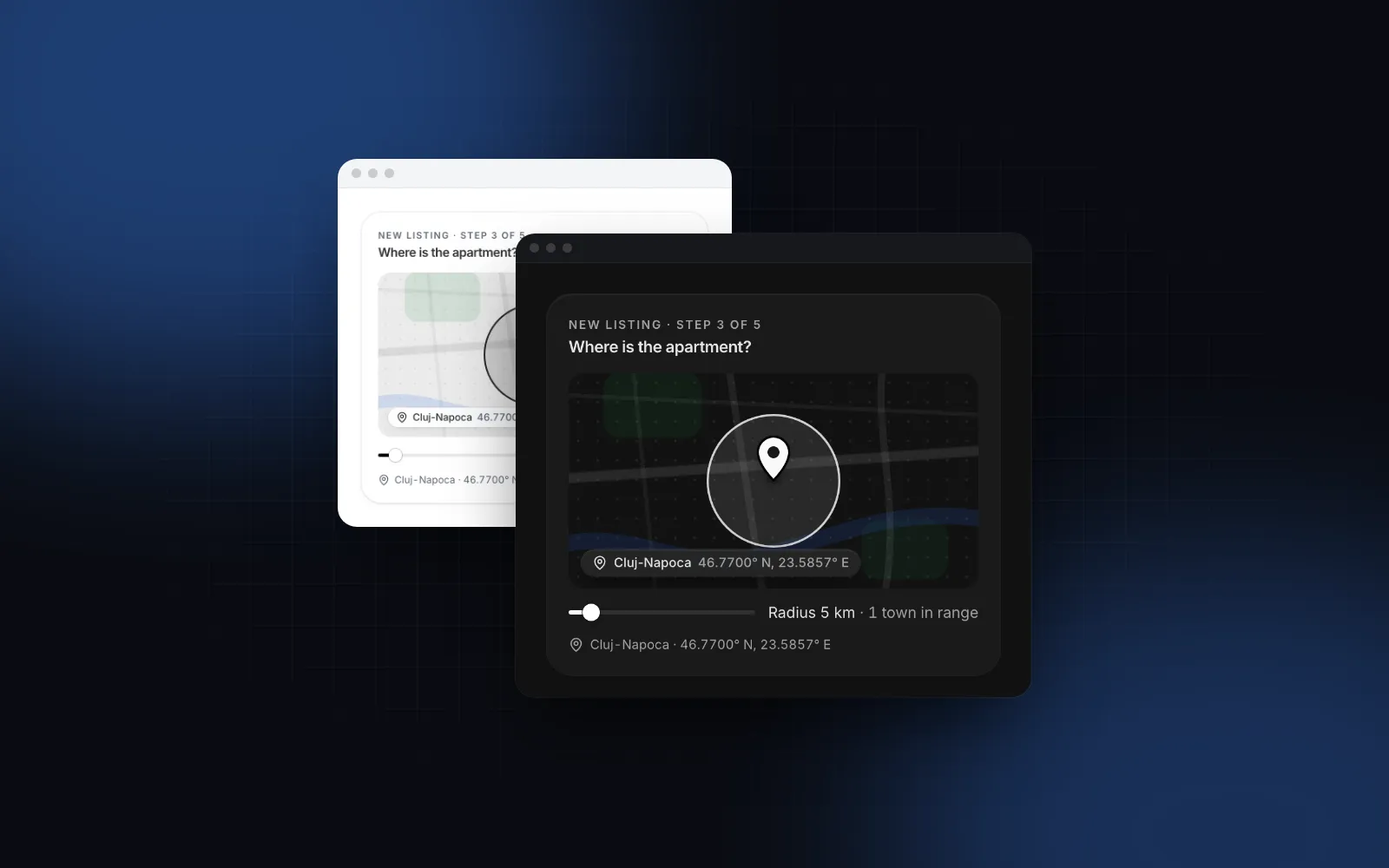
You need a React location picker: a listing form that asks where the apartment is, a checkout that asks where to leave the parcel, a search page that filters by distance. A text field for the address works until the building has no number, the courier needs the back entrance, or the filter is "within 10 miles". Then you need a real map with a pin. This guide covers what a picker has to handle, the props that matter in the Wingo UI Location Map, and full examples for a pin, a radius and address search.
What should a React location picker handle?
Seven things. If you search for "pick location on map react", the typical answer is a react-leaflet useMapEvents click handler that drops a marker, which covers only the first one. Here is the list we hold our own react map picker to:
- Three ways to place the pin. Click or tap the map, drag the pin, and move it with the arrow keys once it has focus.
- Search. Type a town or an address, pick a result, and the map flies there.
- A radius for delivery zones and nearby filters, with a slider that resizes the circle live.
- My location, with an honest message when the browser refuses.
- A scroll that still works. A map that grabs the wheel or a one-finger swipe traps the reader halfway down the page.
- A server-safe load. Leaflet touches
windowon import, which crashes a Next.js server render. - A fallback when tiles or the map chunk never arrive: offline, blocked, or simply not scrolled into view yet.
Points 5 and 7 are the ones you notice in production. A map in the middle of a form on a phone is a 300px area where a swipe pans the map instead of the page, and a map that fails shows a gray box with no idea where the pin was.
Which React map libraries can you build a location picker on?
Leaflet with OpenStreetMap needs no API key, while Google Maps and Mapbox need a key or token and an account. Facts are from each project's public docs, as of October 2026.
Google is the better choice when you need Google's place data and street-level address autocomplete worldwide, and you are fine with billing. Mapbox fits when you want vector styles. A react leaflet location picker is the lightest path to a pin on a map with no account, and that is what the Location Map is built on, so you get Leaflet's tiles without writing the click, drag, search and phone behavior yourself.
What props does the Location Map need?
A value and an onValueChange. The value is a GeoPoint ({ lat, lng }) or null for no pin yet. The map calls onValueChange after a drag ends, a click places the pin, a search result or the locate button moves it, or the keyboard rests.
The CLI copies components/ui/location-map.tsx, the components and helpers it imports, and installs leaflet, motion and lucide-react.
$ npx wingo-ui@latest add location-mapThe built-in search is offline and covers Romanian towns, areas and counties from ro-locations, which is why the demo above sits in Cluj-Napoca. For a US app, pass a center and a geocoder that knows your country:
nominatimGeocoder defaults countryCodes to "ro", so set it (or pass "" for the whole world). The reverse geocoder names the pin with a street and town 500ms after it stops moving. Without one, the place line falls back to the nearest Romanian town, and outside Romania it shows only the coordinates.
The other props you will reach for: defaultZoom (13 shows a neighborhood, 16 a street), draggable and clickToPlace (both on by default), readOnly for a store page that only shows where the store is, searchable and locate to hide the search field or the my-location button, and height (320px by default).
How do I add a radius to the map?
Pass a radius in kilometers. A radius map React apps use for delivery zones or "listings nearby" is one more controlled value: radius and onRadiusChange, with radiusRange and radiusStep for the slider under the map. null or 0 hides both the circle and the slider.
onRadiusChange fires on every step of the slider, and the view fits the circle when you let go. If you draw the zone yourself with plain Leaflet, remember that L.Circle takes meters, not kilometers. showTownsInRadius adds a "14 towns in range" count from the Romanian town list, so turn it off elsewhere. The Slider under the map is the same one you use in forms.
How do I search for an address?
Pass a geocoder: a function that takes the query and { signal, locale } and returns GeocodeResult[] (id, label, optional description, point, optional bounds). The map debounces typing, aborts the previous request through the signal, and fits the view to bounds when a result has them. The results list is the Search Input with arrow keys and Enter.
nominatimGeocoder is a good prototype. OpenStreetMap's Nominatim usage policy (opens in a new tab) allows at most one request per second and rules out client-side autocomplete, and the helper queues requests to one a second, but a search field that queries as you type is still the use case the policy warns against. For production, point the geocoder at your own route, which can call any provider, cache the answers and keep the key on the server:
A geocoder that throws shows "No places found" instead of an error. If you also collect a written address, the pin and the form fields complement each other: the Address Input holds the street and number, the map holds the exact spot. The Romanian address format guide shows that form part by part, and the React combobox guide covers the keyboard rules the results list follows.
How does it behave on a phone?
The inline map does not take the page scroll. With interactive="auto" (the default) the map is live in place with a mouse, while on touch a tap opens a full-height sheet with the search on top, a map you can pinch, drag and tap, and Done at the bottom. Closing the sheet any other way discards the change, so a stray swipe never moves the pin. Inline, a phone shows at most 220px of map, since the full one is a tap away.
interactive="always" keeps the map live in place everywhere, and interactive="expand" always opens the sheet (a dialog on desktop), which suits a compact form row. The sheet is the Drawer; the React bottom sheet guide explains why sheets beat popovers below 768px. On desktop, scrollWheelZoom="focus" lets the wheel zoom only after you clicked into the map and stops when the pointer leaves, so scrolling past the map never gets stuck on it.
Is the location picker accessible?
Yes, with a keyboard path for every move. Tab reaches the search, the map (arrows pan, plus and minus zoom), the pin (arrows move it 10px, Shift and the arrows 50px, committed a moment after you stop), the map buttons and the slider. Screen readers get the map described by the place name and coordinates under it and hear every move as "Pin moved: ..." from a live region. Every string, announcements included, lives in labels and merges over DEFAULT_LOCATION_MAP_LABELS, so you translate it without forking the file. Reduced motion drops the pin's drop animation and the map's animated flights.
What happens when the map cannot load?
A drawn static card takes its place: a neighborhood sketch with the pin, the radius ring and a chip with the place and coordinates. You see it before the map loads (with lazy on, Leaflet loads only once the map is within 200px of the viewport), when the browser is offline, when more than six tiles fail in a row, and when the map chunk fails. Leaflet is imported from an effect, never at module scope, so the component renders on the server without next/dynamic.
staticOnly skips the map entirely. For an email, a print view, a thumbnail or a list of fifty stores, use StaticMap on its own: it needs no map library and no network.
$ npx wingo-ui@latest add location-mapWhat are the common location picker pitfalls?
Four mistakes show up once a picker leaves the demo.
- Shipping on the public OSM tiles. The tile usage policy (opens in a new tab) has no SLA and can block heavy use. Set
tileUrlto your provider's raster tiles andattributionto the credit it requires. - Romanian defaults left on. Without props the map centers on Cluj-Napoca, searches Romanian places offline, counts Romanian towns in the radius and
nominatimGeocoderlimits results to"ro". A US app setscenter,geocoderwithcountryCodes,reverseGeocoderandshowTownsInRadius={false}, as in the examples above. - Saving on every slider step.
onRadiusChangefires per step; save on submit or debounce it. - Dark mode without a plan.
darkTiles="filter"inverts the light tiles in dark mode with no second provider;"url"swaps todarkTileUrl, and"none"keeps light tiles in both themes.
How do I add it to my project?
Run npx wingo-ui@latest add location-map. The Location Map is a Pro component (pricing); the Search Input and Drawer it builds on are free. More single-component deep dives are in the component guides category, and the React form components guide applies the same touch, keyboard and screen reader rules to every form control.
FAQ
How do I get the latitude and longitude when a user clicks a map in React?
In react-leaflet you read the click with the useMapEvents hook and store e.latlng in state. The Wingo UI Location Map does this for you: a click places the pin and onValueChange receives { lat, lng }.
Why does Leaflet throw window is not defined in Next.js?
Leaflet reads window when the module is imported, so importing it in code that runs on the server crashes the render. Load it only in the browser, either with next/dynamic and ssr: false from a client component or with a dynamic import inside an effect, which is what the Location Map does.
What unit does a Leaflet circle radius use?
Leaflet's L.Circle takes its radius in meters. The Location Map's radius prop is in kilometers and converts it for you.
Can I use OpenStreetMap tiles and Nominatim in production?
Only for light use. The OSM tile policy gives no SLA and can block heavy traffic, and the Nominatim policy allows at most one request per second and no client-side autocomplete, so production apps should point tileUrl and the geocoder at their own provider.
Is the Wingo UI Location Map free?
No, the Location Map is a Pro component. The Search Input and Drawer it builds on are free.
- Maps
- Location
- Leaflet
- Mobile UI
- React