React JSON Viewer: Search, Copy Paths and Big Payloads
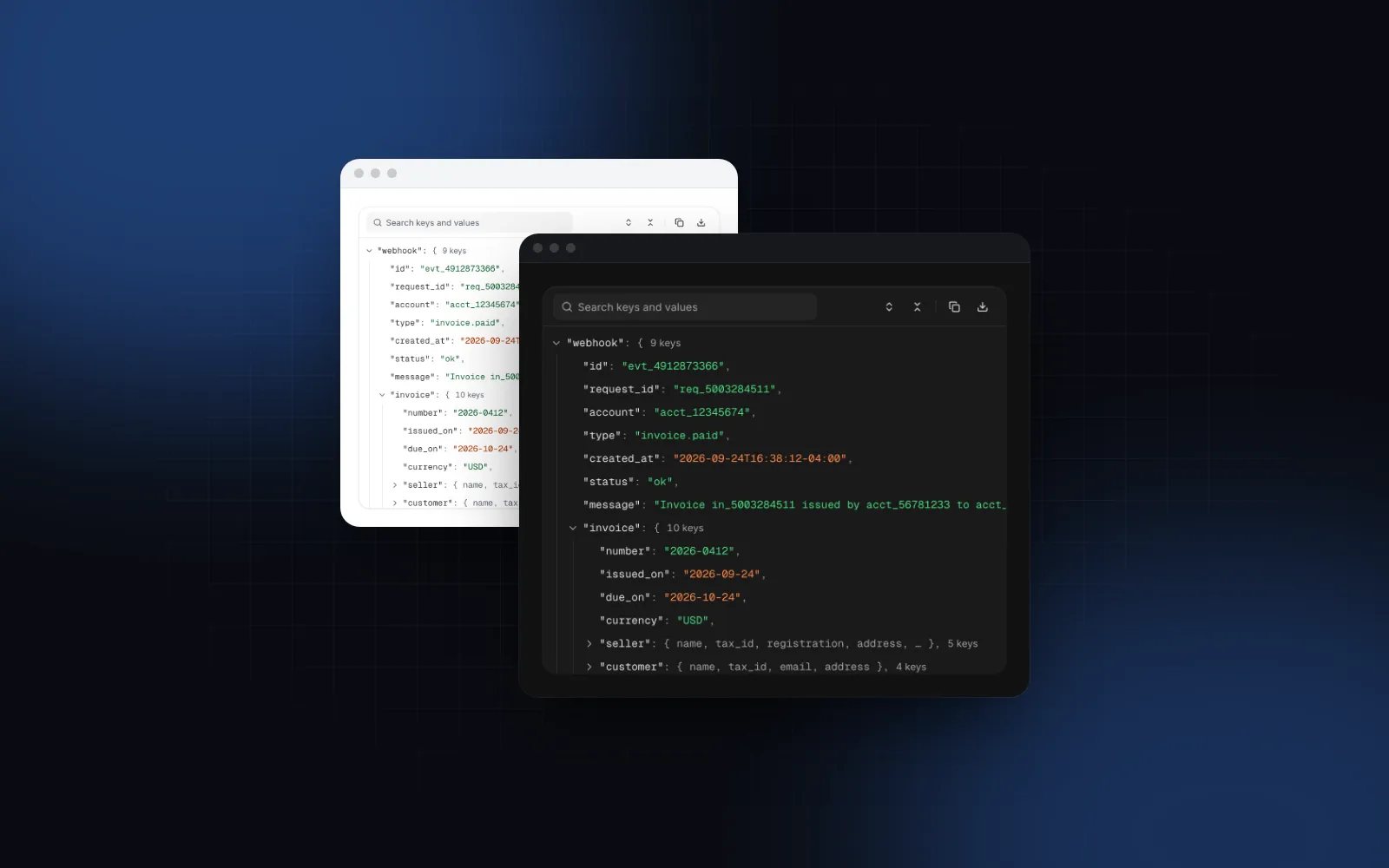
You have a webhook payload, an API response or an AI tool call input, and you need to show it in an admin screen so someone can find the one field that went wrong. A raw JSON.stringify dump works until the payload has 40 keys and three levels of nesting. A React JSON viewer turns that dump into a tree people can open, search and copy from. Below: what the component has to do, the props that matter in the Wingo UI JSON Viewer, how it behaves on a phone and with 10,000-item arrays, and how it compares to the packages most people find first. We build Wingo UI, so we are not neutral; facts about other libraries link to their own docs.
What should a React JSON viewer do?
It should let people open, search and copy from a payload of any size, on any device. Showing nested data is the easy part. Our checklist, and a fair test for any library:
- Collapse and expand objects and arrays, with a preview of what is inside a closed branch (the first keys, or the first values and a count).
- Color by type: strings, numbers, booleans, null and dates should look different, because "is this
0or"0"?" is half of debugging an API. - Search that opens branches. A hit inside a closed branch is useless if the viewer only highlights rows that are already rendered.
- Copy a value or its path, so the path can go straight into code or a bug report.
- Large payloads that do not freeze the tab: paging for long arrays and virtualization for long trees.
- Keyboard and screen readers: one Tab stop, arrow keys, and real tree semantics.
- Phones: rows big enough to tap and actions that do not depend on hover.
Install the component and give it data:
The component file starts with "use client", so you can render it straight from a Server Component as long as data is serializable and you pass no functions. If the value came from a database column as text, parse it first: the viewer does not parse strings that contain JSON, and an unparsed payload shows as one long string.
$ npx wingo-ui@latest add json-viewerHow do I search inside a JSON tree?
The search runs over the whole payload and opens every branch that contains a hit, which is what most people mean when they look for a React JSON viewer with search. Type in the toolbar, or press Ctrl+F (⌘F on a Mac) while focus is inside the viewer. Every key or value that matches is highlighted, the branches that contain a hit open, and the first hit scrolls to the middle of the panel. Enter and Shift+Enter step through the hits, the counter reads "2 of 5", and Escape clears the search. Case and diacritics are ignored, and numbers, true and null match as their text.
Two props shape it. searchIn limits matching to "keys", "values" or "both" (the default), and searchable={false} removes the box when the payload is small. To start a search from your own UI, for example from a log line that mentions an invoice number, take the API from setApi:
The same API has expandAll, collapseAll, expandToDepth(depth), expandPath(path) and scrollToPath(path). expandPath(["invoice", "lines"]) opens that branch and its ancestors, which is how you deep link to a field from an error message.
How do I copy a value or its path?
Every row has two actions, Copy value and Copy path, and each input method reaches them differently. With a mouse they appear when you hover or focus the row. From the keyboard, c copies the value and Shift+C the path. On a touch screen, a long press opens a sheet with the same actions, the full value (and a date in local time), and Expand all from here.
pathFormat decides what Copy path produces:
rootPathName replaces data at the start of JS paths, so rootPathName="webhook" copies webhook.invoice.customer.name. If you need the path in your own code, onSelect(path, value) fires when someone activates a value with Enter, a click or a tap, and the selected row stays highlighted. formatJsonPath(path, "pointer") turns the JsonPath array into text the same way the copy action does.
$ npx wingo-ui@latest add json-viewerWhich JSON viewer props matter most?
Most screens only set three or four. The full list with defaults is on the JSON Viewer docs page.
size="sm" (24px rows, 12px text) with toolbar={false} fits a compact card, such as a large tool result in an agent UI. The Tool Call Timeline prints each step's arguments and result in a Code Block, which is fine for small inputs; a compact viewer is the better fit when a tool returns a deep, nested result (the AI agent tool call UI guide covers the rest of that screen). To fill a resizable pane, give the root className="h-full" and set both height={0} and maxHeight={0}. Every string is in labels, with English defaults in DEFAULT_JSON_VIEWER_LABELS, and counts and dates follow locale.
Is the JSON tree accessible?
Yes. The body is one Tab stop with role="tree", and each row is a treeitem with its level, position and expanded state. Up and Down move, Page Up and Page Down jump 10 rows, Right opens a branch or steps into it, Left closes it or goes to the parent, Home and End jump to the first and last row, and * opens every sibling. Enter toggles a branch or selects a value, and the context menu key (or Shift+F10) opens the row's actions. Copy and download feedback is announced through a polite live region, so a screen reader hears "Copied".
How does it behave on a phone?
Rows grow from 28px to 36px on touch screens. That is below the usual 44px touch target on purpose: at 44px a phone shows about 12 lines of the tree, which is too little context to read nested data, so the long-press sheet carries the actions instead of tiny row buttons. Long values wrap under their key below 512px of the viewer's width instead of scrolling sideways (wrap="auto"), and below the same width the toolbar folds its actions into a ⋯ menu. Row actions move from hover to a long press, so nothing depends on a pointer. If the payload is the main content of a screen, give it most of the viewport height; a 200px panel on a phone shows about five rows.
How do I render very large JSON payloads?
It pages long arrays and virtualizes long trees. An array over 100 items opens as rows of pages, so a list of 10,000 records shows 100 closed rows labeled like [0 … 99], and each opens its 100 items. Above virtualThreshold (300 visible rows by default), only the rows on screen are in the DOM, measured one by one with 12 rows of overscan. Long strings such as base64 files stop at maxStringLength, and a search hit further inside one shows the whole string. Circular references print as [Circular → data.parent] instead of crashing, and BigInt, NaN, Infinity, Maps and Sets get a readable form.
Two pitfalls worth knowing. defaultExpandDepth applies on mount only, so changing it later does nothing; call api.expandToDepth(n) or change the component's key. And Copy JSON and Download export everything in data, so strip tokens and personal data on the server before the payload reaches an admin page.
Is there a react json view alternative that is still maintained?
Search "json tree react" and the same few packages come up. Here is what their own READMEs and docs document, as of October 2026:
Where another package is the better pick: if people need to edit the JSON in place, use @microlink/react-json-view, because our viewer is read only. If you want the smallest read-only collapsible JSON React component and do not need search or copy, react-json-view-lite is a reasonable choice. For a tree of folders or categories instead of raw data, the Tree View is a better fit than any JSON viewer.
When is a code block enough?
When the JSON is short and fixed: an example request in docs, a config snippet, a sample response. Nobody needs to collapse five lines. The free Code Block highlights JSON with language="json", adds line numbers and a copy button, and costs nothing to install. Use the viewer when the data is live, long or nested, and people need to find something inside it. For streams of log lines with JSON attached, the Log Viewer streams the lines and opens a line's JSON tree under it when you click or tap it, using this same viewer (React log viewer guide). When the tree is your own data, such as folders or permissions people tick and drag around, the React tree view guide fits better than a JSON viewer.
$ npx wingo-ui@latest add code-blockHow do I add the JSON viewer to a Next.js project?
Run the add command in a Next.js project with Tailwind CSS v4. The CLI copies the component into components/ui, adds the hooks and helpers it imports, and installs its npm packages, including @tanstack/react-virtual and motion:
The JSON Viewer is part of Wingo UI Pro, which costs $8 a month, $80 a year or $150 once as of October 2026 (Wingo UI pricing); the Code Block is free. For a full admin screen around it, the Next.js admin dashboard tutorial builds the pages, and the React AI chat UI guide covers where tool call payloads appear in a chat. More guides live in the component guides category, starting with the React form components guide.
FAQ
How do I display JSON in React?
For a short, fixed snippet, JSON.stringify(value, null, 2) inside a pre element or a code block is enough. For payloads people need to explore, such as webhooks, API responses or tool call inputs, use a JSON viewer component that renders a collapsible tree with search and copy.
Is react-json-view still maintained?
No. The original mac-s-g/react-json-view README says the author can no longer maintain it and points to @microlink/react-json-view as a replacement candidate. Check the peer dependencies of any fork against your React version before you install it.
How do I search inside a JSON tree in React?
Match keys and values against the query over the whole data, not only the rendered rows, then open the ancestors of every hit and scroll to the first one. The Wingo UI JSON Viewer does this from its toolbar search, and setApi gives you search(query) to start a search from code.
Can a React JSON viewer handle 10,000 items?
Yes, if it virtualizes. The Wingo UI JSON Viewer opens long arrays in pages of 100 and, above 300 visible rows, renders only the rows on screen; its docs include a 10,000 contact example.
Should a JSON string be passed to the viewer as is?
No. Parse it first with JSON.parse inside a try block. The Wingo UI JSON Viewer does not parse strings that contain JSON, so an unparsed payload shows as one long string value.
- JSON
- Data display
- Developer tools
- Admin
- Accessibility