React Charts Tailwind: 4 Charts and a Kit for Any Theme
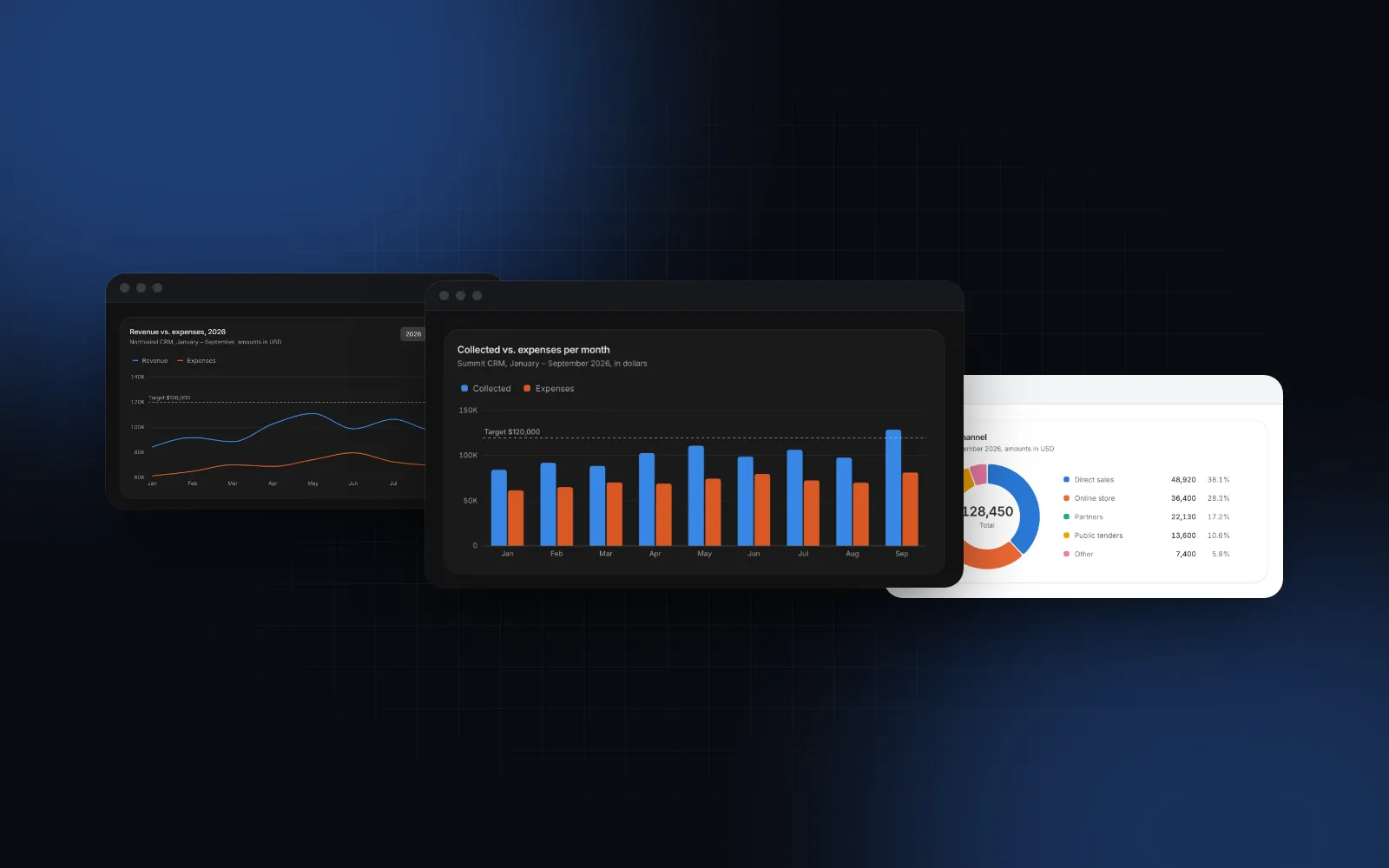
You are building a dashboard and you want React charts Tailwind can actually theme, so they look like the rest of the app. Tailwind classes do not reach inside most chart libraries: the colors live in a JavaScript config, the tooltip has its own font, dark mode turns the grid into bright lines, and on a phone the tooltip sits under your thumb. This list covers what React charts with Tailwind need to get right, how the common libraries handle it, and five Wingo UI pieces for a dashboard: the Area Chart, Bar Chart, Line Chart, Donut Chart and the Chart Kit under them, each with a demo or a snippet.
What should React charts with Tailwind get right?
Six things, and the first two are about Tailwind specifically:
- Colors as tokens. Every series color is a CSS variable, so it follows your theme like
bg-carddoes, and nobody hardcodes#8884d8in a component. - A designed dark mode. Dark gets its own color steps. A blue that reads well on white is often too dark on near black, and an automatic flip does not fix that.
- A phone layout. On a touch screen the readout pins above the plot instead of following a finger, a sideways drag scrubs through points, and a vertical drag still scrolls the page.
- Screen reader and keyboard access. A chart is a picture of numbers, so it needs the numbers in text: a label, a short takeaway and a data table.
- No layout shift. The chart reserves its height before it measures its width, so the page does not jump when it renders on the client.
- Number formatting. Currency, compact ticks ("$128K") and dates go through
Intl, with alocaleprop.
Point 3 is the easiest to miss when you only test with a mouse on a wide screen: the tooltip you hover on a laptop ends up under the thumb that tapped it on a phone.
Which React Tailwind chart library should you pick?
Most of the popular options build on Recharts, which itself draws with D3 modules. Facts below are from each project's docs and the npm registry, checked on October 19, 2026.
Recharts is a solid default, and both shadcn/ui and Tremor build on it. Since version 3.0 its release notes (opens in a new tab) say the accessibility layer is on by default on cartesian and polar charts, so keyboard and screen reader support come built in. If your team already knows its API, stay on it. A Recharts alternative pays off when you want different defaults for phones and dark mode and want to own the chart source. The shadcn chart docs note that the container needs a min-h-[VALUE] class to be responsive, which is worth knowing before you ship one.
Chart.js is the one to think twice about in a Tailwind app. Its colors are JavaScript options drawn onto a canvas, so dark mode means reading token values with getComputedStyle and redrawing when the theme changes.
How are d3 React charts different from Recharts?
They are one layer thinner. In d3 React charts, d3-scale turns values into pixels and d3-shape turns points into an SVG path string; React renders the <path> and owns the DOM. Recharts does the same math inside its own components, and you configure them with props.
The Wingo UI charts use that thin approach: no Recharts, no d3-selection, nothing that touches the DOM outside React. The practical difference for you is that the source you copy is the chart itself, so changing how a tooltip or a bar end looks means editing a file you own. The d3-shape docs (opens in a new tab) describe the same pattern: a line generator's output goes straight into a path's d attribute.
1. Area chart: how do I show revenue by channel over time?
Use stacked areas when the series add up to a total, overlapping areas when you compare two volumes, and percent when you care about shares. The Area Chart does all three with one type prop, and switching between them glides the bands to their new shape.
ISO months such as "2026-09" print as "Sep" on the axis and "September 2026" in the readout. The readout of a stacked chart lists the top band first and adds a Total row; a percent chart shows each value with its share. fill switches between "gradient" (the default), "solid" and "none", and referenceLines draws dashed targets.
2. Bar chart: how do I compare months or categories?
Use bars for discrete periods and categories. The Bar Chart is grouped by default, and also does stacked and percent. Negative values grow down from a clear zero line, and getBarColor paints a bar by its value:
"danger" and "success" are tone names, so the bars use your status tokens in both themes. Value labels from showValues switch to the compact form ("$128K") when full amounts do not fit, and a label with no room moves inside its bar or is skipped, never clipped. For long category names on a phone, set orientation="horizontal": the names move into a label column on the left and the tooltip keeps the full text.
Hover or tap a month in the demo, then switch to Stacked and 100% to see the bars move.
$ npx wingo-ui@latest add bar-chart3. Line chart: how do I show a trend against last year?
Use a line for a trend over many points, and a dashed second series for the comparison period. In the Line Chart, a series with dashed: true draws at 70% opacity with a muted row in the readout.
endLabels puts the last value and the series name at the end of each line. Under 360px it keeps only the short value and a legend names the lines, and a label that would collide is dropped, never nudged on top of another. For a calm single KPI line, pass colors={["neutral"]} with showArea and showDots. To line up two charts stacked on top of each other, give both the same yAxisWidth and share one activeIndex, so the crosshair moves in both.
Switch to Compare 2025 in the demo and move along the line to read both years.
$ npx wingo-ui@latest add line-chart4. Donut chart: how do I show parts of a whole?
Use a donut when there are a handful of parts and the total matters. The Donut Chart shows the total in the middle and a legend with values and shares, and it folds anything past maxSlices (6 by default) into one gray Other slice whose readout lists what is inside.
Slices are sorted biggest first by default (sort="none" keeps your order). Select a slice and it stays lifted while the center reads its value, name and share; value and onValueChange make that selection controlled, so a list next to the chart can drive it. The legend sits beside the chart from a 480px wide container and below it on narrower ones. That is a container query, so it is right in the server HTML and in a narrow dashboard column on a desktop.
The ring's hit area is widened by 12px on each side for both mouse and touch, so thin rings and small slices are easy to hit. On a phone, sliding a finger along the ring scrubs through the slices, and the scrub ends by selecting the slice it rests on.
$ npx wingo-ui@latest add donut-chart5. Chart kit: how do I build a chart type that is not in the list?
Use the Chart Kit, the shared layer the four charts are built on. It exports the palette, formatters, a measuring container, scales, axes, grid, the crosshair inspector, tooltip, legend, the screen reader table and the loading and empty states. A custom chart composes those parts and gets the same touch, keyboard and theme behavior:
ChartContainer reserves the 200px before it measures, then calls your function with the real width and height. niceScale returns a linear scale with about one tick per 56px, and getCurve and stackData wrap the d3-shape curves and stacks when you need lines or bands. The kit is how the library's other charts, such as the Sparkline and the Gauge, stay consistent with these four.
How do the charts handle dark mode?
Good React charts dark mode support starts with colors that have their own dark values. The Wingo UI charts have eight palette slots. ChartContainer sets --series-1 to --series-8 on the figure, and the dark theme swaps them for separately chosen steps instead of inverting the light ones. The comment in the source says the order was checked so neighboring colors stay apart for the common kinds of color blindness in both themes. A ninth series never gets a new hue; it becomes "other", a gray mixed from your foreground color.
Every color and colors prop takes three kinds of values: a slot ("series-3"), a tone ("neutral", "brand", "success", "danger", mapped to your status tokens) or any CSS color. Grid lines are a faint foreground tint and axis labels use the muted text color, so they recede in both themes. Gaps between bar segments and the rings around dots are painted in the surface color, which defaults to var(--surface). Set it when the chart sits on a different fill, for example surface="var(--card)", so the gaps match what is behind them. The Tailwind v4 dark mode guide covers the class toggle and token setup these variables rely on.
How do the charts work on a phone?
The readout moves out from under your finger. tooltipMode="auto" floats the readout beside the crosshair with a mouse and pins it above the plot on touch screens. Tap a point to pin it, drag sideways to scrub, and tap again or anywhere outside to clear. The plot layer only claims horizontal drags, so a vertical swipe still scrolls the page.
X axis labels are thinned from the newest one backwards, so the latest month always shows and labels never overlap at 360px. Legends wrap, and legend entries are real buttons with a larger hit area on coarse pointers. For a dashboard that also runs on phones, the Next.js admin dashboard tutorial shows these charts inside a full app shell.
Are the charts accessible?
Each chart is an element with role="figure" and an accessible name from label and an optional one-sentence takeaway from description, read through aria-describedby. Every chart also renders a data table that is hidden from sight and present in the server HTML, so a screen reader or a crawler gets the numbers without running JavaScript. With the keyboard, Tab to the plot, then Left and Right walk the points (or the slices of a donut), Home and End jump to the ends, and Escape clears, while a live region reads each point. Enter fires onDatumClick on the area, bar and line charts and selects a slice on the donut.
Areas rise, lines draw in and slices sweep the first time a chart scrolls into view. With reduced motion turned on in the operating system, the final chart shows at once (how reduced motion works in React).
How do I add the charts to my project?
Install the ones you need:
The CLI copies the charts into components/ui, adds the chart kit as lib/chart-kit.tsx along with the hooks and helpers the charts import, and installs d3-scale, d3-shape and motion. The charts are Pro items (pricing). For the full picture of libraries for dashboards, read the best React component library for dashboard apps comparison, and the component guides category has more single-component deep dives, starting with the React form components guide.
FAQ
What is the best chart library for React and Tailwind?
If you already use shadcn/ui, its chart component on Recharts v3 is the low-friction choice, and Tremor offers a similar Tailwind look, also on Recharts. If you want charts that are already designed for phones and dark mode, with the source in your repository, the Wingo UI charts are an option.
How do I make React charts work in dark mode?
Use an SVG chart library and give every series color as a CSS variable, with its own value in the dark theme instead of an automatic inversion. Canvas libraries such as Chart.js take their colors from JavaScript options, so you read the token values yourself and redraw on a theme switch.
Is there a Recharts alternative that uses Tailwind?
Tremor and shadcn/ui use Tailwind but still run on Recharts. The Wingo UI charts drop Recharts: SVG drawn with d3-scale and d3-shape, styled with Tailwind tokens, copied into your project as source.
Can I use d3 with React without touching the DOM?
Yes. Use d3-scale to map values to pixels and d3-shape to build path strings, then render the SVG with JSX. React owns the DOM and d3 only does the math, which is how the Wingo UI chart kit works.
Are the Wingo UI charts free?
No. The area, bar, line and donut charts and the chart kit are Pro items. As of October 2026, Pro costs $8 a month, $80 a year or $150 once.
- Charts
- Tailwind CSS
- Dark mode
- Dashboard
- React