React QR Code with Logo: Rounded Modules, PNG and SVG
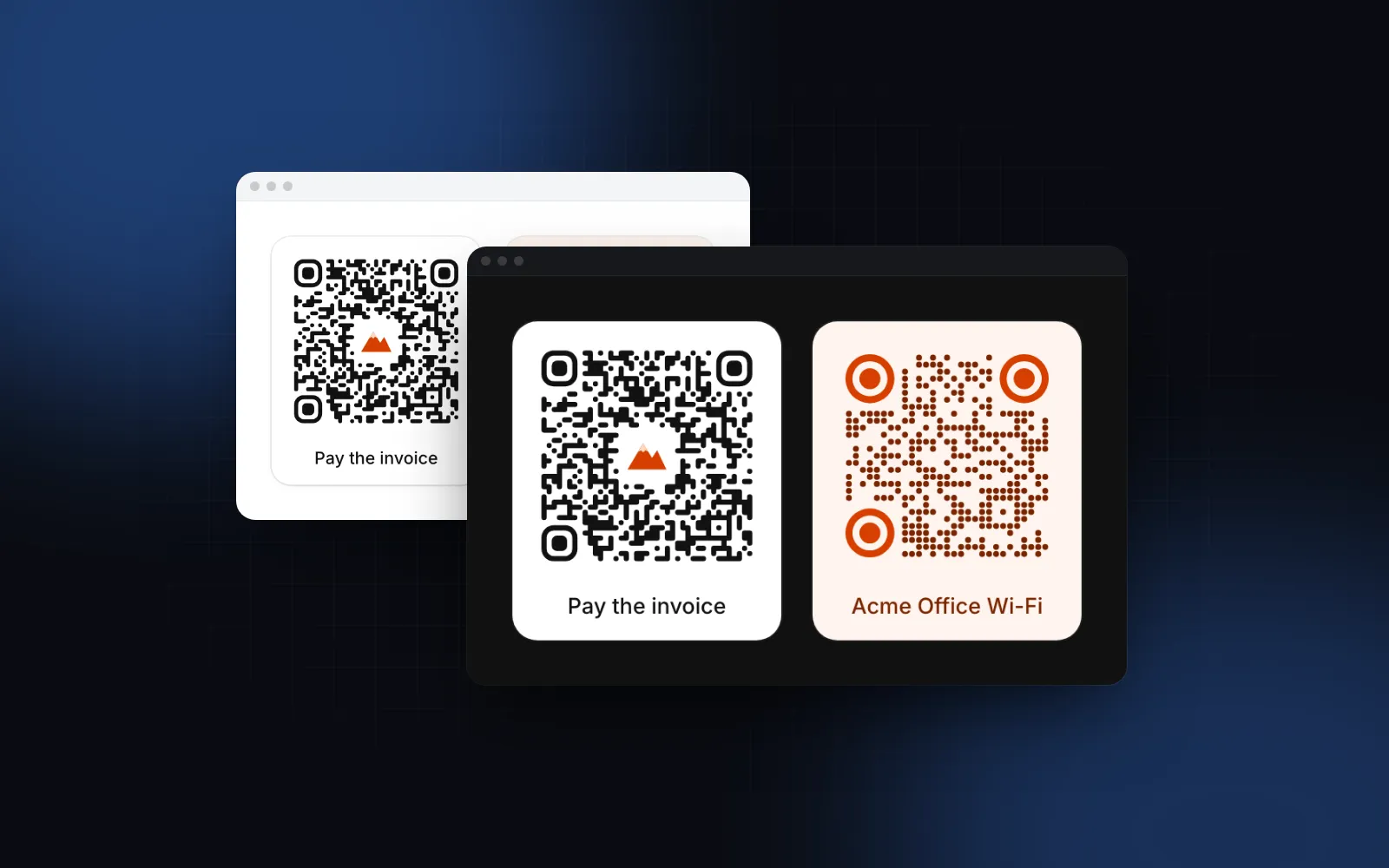
You need a React QR code with logo for an invoice, a ticket or the office Wi-Fi card. The first version is a black and white grid from a library. Then design asks for the brand mark in the middle, rounded dots and the brand orange on the corner eyes, marketing asks for a 2048px PNG for print, and somebody points a phone at the dark mode screen and nothing happens. This guide covers what keeps a styled code scannable, the props that matter in the Wingo UI QR Code, how PNG and SVG export works, and a full example.
Can a QR code with a logo in the middle still scan?
Yes, because QR codes carry error correction. Redundant data spread across the grid lets a scanner rebuild the message when part of it is missing, and a logo is damage you add on purpose. Four levels set how much redundancy the code carries:
The trade-off is density: the same url needs more modules per side at H than at L, so each module is smaller and harder to read from a distance. That is why a good React QR code generator with logo does two things together: it clears only the modules the logo actually covers, and it raises the level just enough to pay for them.
The Wingo UI QR Code raises the level for you. With a logo, level becomes at least Q, and H when logoSize is above 0.2. The level in use is on the root as data-level, and the effectiveQrLevel(level, logoSize) helper returns the same answer if you want to show it. The default logoSize is 0.22 of the code width, so the logo tile covers about 5% of the grid (0.22 squared). The cleared square adds a ring of air around it, and the total is still well under the 30% that H can recover. Because 0.22 is above 0.2, the default logo runs at H.
Three rules decide whether the code scans:
- Leave the three corner eyes alone. The finder patterns are how a camera finds and orients the code. Recolor them, round them, never cover them.
- Dark modules on a light background. Not every scanner reads inverted (light on dark) codes. The component keeps
#111111on#ffffffin dark mode on purpose. - A quiet zone. An empty border around the code separates it from the page. The default
marginis 2 modules, drawn inside a tile that adds 12px of padding in the same color. For a bare code on paper withframed={false}, setmargin={4}, the ISO minimum.
What do the React QR code libraries offer?
Three packages come up for a React QR code with a logo, each with a different shape. Facts are from each project's README and its latest npm release as of October 19, 2026.
qrcode.react is the right pick when you want a plain, small, well-known code and will write your own download button. react-qrcode-logo is the better choice when you want a canvas, a raster download and blob helpers that run without a mounted component. qr-code-styling has the widest range of React QR code styling options (classy and extra-rounded shapes, gradients) if you are happy to wrap a vanilla library in a ref. Watch the defaults in both: qrcode.react starts at level L with no margin, and react-qrcode-logo keeps the modules behind the logo unless you turn on removeQrCodeBehindLogo, so a logo there needs a higher ecLevel. The rest of this guide covers the Wingo UI component.
What props does a React QR code with a logo need?
One. value is the text to encode: a url, a WIFI:T:WPA;S:...;; string or a payment string. Everything else has a default that scans: rounded modules, rounded eyes, 192px, level M, dark on white.
The props you will change most:
logo: an image url or a React node, such as an inline<svg>mark. It is drawn on a cleared tile in the center with rounded corners in thebackgroundcolor.logoSize: the tile width as a fraction of the code, clamped to 0.1 to 0.3.excavate: clears the modules under the logo plus at least half a module of air around it (default true). Off lays the tile over the modules, which costs more error correction.size: the code width in px (the frame adds 12px of padding). It never grows past its container, and it is raised so every module is at least 1.5px, with a warning in development.captionandshowValue: a line under the code, and the encoded text with a copy button and a Tooltip.framedandradius: the tile with its shadow, and its corners fromnonetofull.
An empty value shows an empty tile and text too long for the level an error tile. Nothing throws.
$ npx wingo-ui@latest add qr-codeHow do I style a QR code in React without breaking it?
Change the shape of each cell, keep which cells are dark. moduleStyle has three values:
square: classic crisp squares, drawn as horizontal runs so there are no seams.rounded(default): a corner rounds only where neither neighbor touches it, so neighboring modules merge into pills and blobs.dots: circles at 85% of the cell.
finderStyle shapes the three eyes as square, rounded or circle, an outer ring and an inner eye in the same shape. finderColor paints them in a second color, which is the safest place for a brand color: the eyes are large, so a mid-tone orange still reads.
Keep color dark and background light. A cream tile and a deep green works; light gray on white does not. background="transparent" is allowed for a code printed on a colored card, and then the contrast is up to you. If you build the palette with a picker, the React color picker guide covers HEX and OKLCH input.
$ npx wingo-ui@latest add qr-codeHow do I download a React QR code as PNG or SVG?
Turn on downloadable, which covers the usual React QR code download PNG request without a canvas helper of your own. A Download button opens a menu with a PNG at exportSize (1024px by default) and an SVG that stays sharp at any size. On phones the menu opens as a bottom sheet through the Dropdown Menu, and where the device can share files a Share row opens the phone's share sheet. Where the clipboard accepts images, a Copy image button sits next to it. File names are timestamped: fileName="Invoice 2026-0412" downloads as Invoice-2026-0412-2026-10-19-1640.png (spaces become hyphens).
Exports are built from the same geometry the screen shows. The SVG export is standalone text with inline colors, and the PNG is that SVG drawn onto a canvas by the file export helpers. That has one consequence for logos: an exported file can only embed a logo the browser can read. Inline svg nodes and data urls always work, same-origin urls and urls with CORS headers are fetched once and inlined, and a cross-origin logo without CORS is left out of the export (the cleared tile and raised level stay). If your logo lives on a CDN, pass it as an inline svg or serve it with CORS.
For your own buttons, setApi hands you { toSvgString, toBlob, download, copy } once after mount:
toBlob also takes type, quality and background, so a JPEG with a white background is one option away. Call api.copy() straight from a click handler: Safari only allows clipboard writes inside the user's gesture. onExport runs after every finished download, share or copy with the action, format, file name and blob, which is the place for analytics. To build the same SVG text outside a mounted component, qrToSvgString(value, options) takes the same options as the props and needs no DOM or canvas.
Is the QR code accessible?
The code is an SVG with role="img" and an accessible name from labels.image, QR code: <value> by default, so a screen reader user hears where the code leads. Downloads and copies are announced in a polite live region. Tab reaches Download and Copy image in order, Enter or Space opens the menu, the arrow keys move through it and Escape returns focus to the trigger. Every visible and announced string lives in labels and merges over DEFAULT_QR_CODE_LABELS, so the component translates without a fork.
With showValue the url sits under the code with a copy button, for the person reading on the same phone the code would open. Copying uses the free use-clipboard hook.
What are the common QR code pitfalls?
- A logo with no error correction to back it. Covering modules at level L or M without raising it is the most common reason a branded code stops scanning. Here the level is raised for you; elsewhere set it yourself.
- Too much text. A long url with tracking parameters at level H becomes a dense grid of tiny modules. Shorten the url before you style the code.
- Inverted colors in dark mode. A light code on a dark page looks right and fails on scanners that do not handle inverted codes. Keep the light tile.
- Not testing. Scan the final export with two or three phones, from a screen and from paper, before it goes on anything printed.
How do I add it to my project?
Run npx wingo-ui@latest add qr-code. The CLI copies qr-code.tsx into components/ui, adds the button, dropdown menu, skeleton and tooltip it imports, the clipboard hook in hooks/, the file export, motion and UI config helpers in lib/, and installs qrcode, motion and lucide-react. The QR Code is a Pro component (pricing). The React signature pad guide uses the same PNG and SVG export helpers, and more single-component deep dives are in the component guides category, next to the React form components guide.
FAQ
How do I add a logo to a QR code in React?
Use a QR component that takes a logo and clears the modules under it, then raise the error correction level. In the Wingo UI QR Code you pass logo as an image url or an inline svg node, and the component clears a tile in the center and raises the level to at least Q.
What error correction level should a QR code with a logo use?
Q or H. Q recovers about 25% of damaged data and H about 30%, so a logo that hides some modules still decodes. Higher levels make the grid denser, so keep the logo small rather than relying on H alone.
How big can the logo in a QR code be?
Keep it well under the recovery limit and away from the three corner eyes. The Wingo UI QR Code clamps the logo tile to 10% to 30% of the code width and defaults to 22%, a tile that covers about 5% of the grid area.
How do I download a React QR code as PNG?
Render the code as SVG, draw it onto a canvas at the size you want and save the canvas as a PNG blob. The Wingo UI QR Code does this with downloadable (a Download menu with PNG and SVG) or with setApi, which gives you toBlob, toSvgString, download and copy for your own buttons.
Do styled QR codes with rounded dots still scan?
Yes, when the modules stay inside their grid cells, the finder patterns keep their shape and the contrast is high. Rounded and dotted modules only change the outline of each cell, so the same cells stay dark and the data is the same.
Is the Wingo UI QR Code free?
No, the QR Code is a Pro component, and so are the file export helpers it uses. The button, tooltip, dropdown menu, skeleton and clipboard hook it builds on are free.
- QR code
- Export
- Images
- React
- Accessibility