React Color Picker: HEX, RGB, HSL, Eyedropper and OKLCH
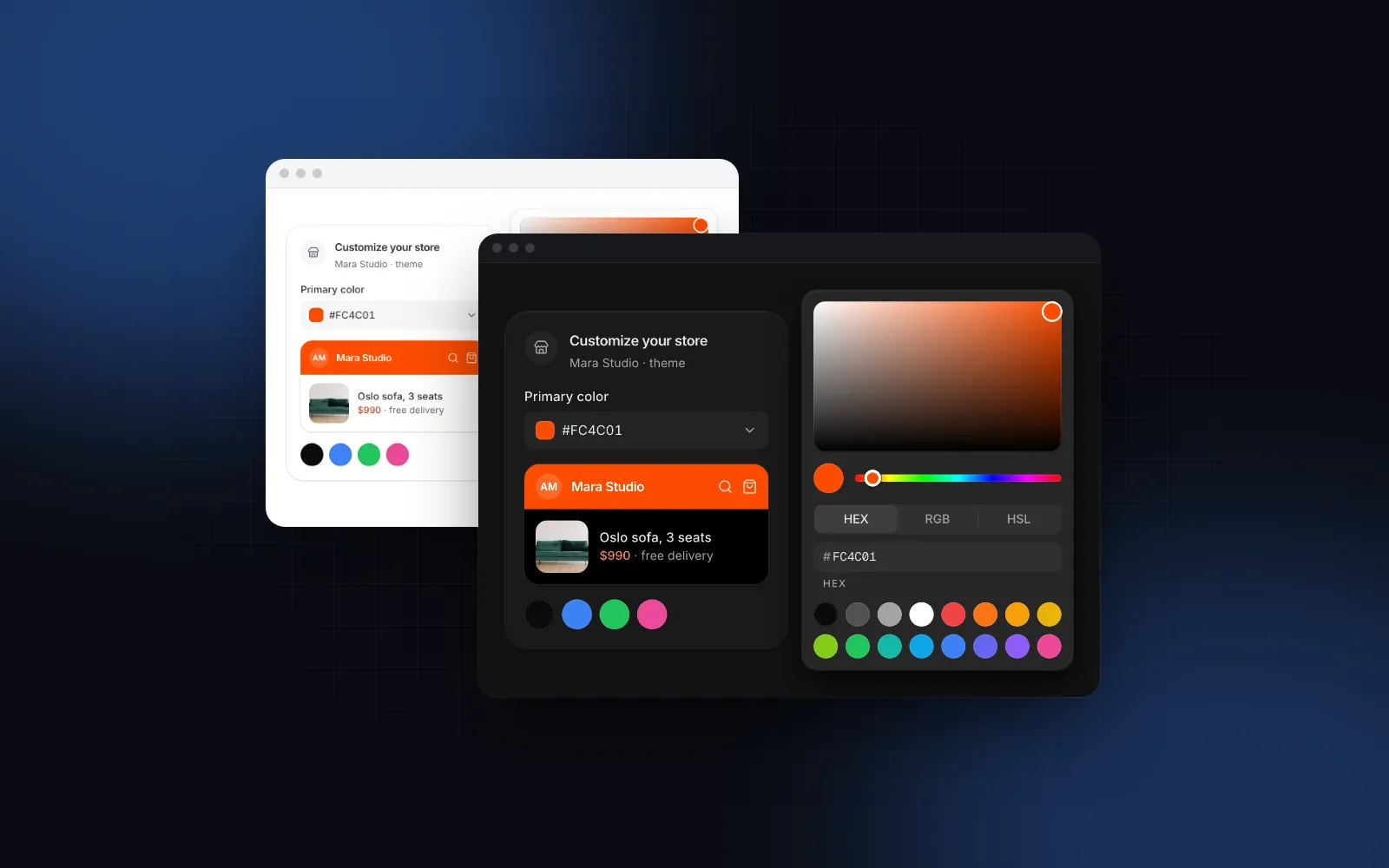
A React color picker looks like a weekend task until you list what users expect: a square to drag in, a hue bar, a field where a designer pastes #FC4C01, RGB or HSL channels for the developer who thinks in numbers, brand swatches, opacity, a pipette that grabs a color from the logo, keyboard support, and something usable on a phone. Then the value has to land in a design system that, in Tailwind CSS v4, is written in OKLCH. This guide covers each part with the Color Picker from Wingo UI. We build that library, so we are not neutral. Outside facts link to their sources and are dated.
What should a React color picker include?
A complete picker has a saturation and brightness square, a hue bar, text fields in HEX, RGB and HSL, preset swatches, keyboard control of every surface and a phone layout. Opacity and an eyedropper are the two optional parts. Small libraries such as react-colorful (opens in a new tab) (3.1 KB gzipped and no dependencies, per its README in October 2026) give you the drag surfaces and a hex input, and you build the rest. Here is the checklist either way:
- A saturation and brightness square plus a hue bar. This is the HSV model, the fastest way to explore.
- Text fields in HEX, RGB and HSL. People paste values from Figma, a brand guide or DevTools, so every React color picker input should accept pasted text and reject garbage without losing the last good color.
- Swatches, because most real choices are "one of our eight brand colors".
- Opacity for shadows and overlays, off by default.
- An eyedropper where the browser has one.
- Keyboard support for the square and the bars, not only the text fields.
- A phone layout, since a 288px popover is hard to drag in with a thumb.
Does shadcn/ui have a color picker?
No. As of October 16, 2026 the shadcn/ui components page (opens in a new tab) lists Popover, Slider, Input and Toggle Group, but no color picker, and suggests its registry directory for community components. A shadcn color picker is therefore a composition: a Popover, sliders for hue and alpha, a custom 2D area (Radix has no 2D slider), an input with your own parsing, and swatch buttons.
The Wingo UI component is built the same way, on Radix Popover and Radix Slider, and installs as source code with a shadcn-style CLI, so the files are yours to read and edit:
The command also pulls in what it imports: Field for the label and error anatomy, Drawer for the phone sheet, Segmented Control for the HEX / RGB / HSL switch, Button, and the small helpers it shares with the rest of the library (controllable state, media queries, motion presets and UIProvider defaults).
How do you use the Color Picker in React?
Render ColorPicker with a label and a value: it shows a field, and clicking it opens a panel with the square, the hue bar, the format switch, the inputs and 16 default swatches.
Two callbacks matter here. onValueChange fires live while you drag, at most once per animation frame, so a preview can follow the thumb. onValueCommit fires when the change is final: pointer up, Enter or blur in a text field, a swatch tap, an eyedropper pick, a key in the square, or the phone sheet's Done button. Save in the second one, or a single drag sends dozens of requests. The name prop renders a hidden input, so a native form or a server action reads the color with formData.get("primary_color").
Try it below: drag in the square, then switch to RGB and type a value. Text that is not a color turns the field red and goes back to the last good color.
$ npx wingo-ui@latest add color-pickerHow do the HEX, RGB and HSL inputs behave?
The format prop ("hex", "rgb" or "hsl", default "hex") sets the output string and the fields the panel shows first. The switch inside the panel only changes which fields are visible, so a user can type RGB channels while your state keeps receiving hex. The output shapes are fixed: "#FC4C01", "rgb(252, 76, 1)" and "hsl(18, 99%, 50%)".
A few details save support tickets:
- A 3-digit hex expands, so typing
F60gives#FF6600. The#is optional. - ArrowUp and ArrowDown in a number field step by 1, Shift by 10.
defaultValueandvalueaccept any color the parser reads: hex with 3, 4, 6 or 8 digits,rgb()/rgba(),hsl()/hsla()with commas or spaces, and the 16 basic CSS names. The parser uses no canvas, so it also runs on the server.
The same conversions are exported for your own code. parseColor(text) returns an Hsva or null, and formatColor(hsva, format, alpha) writes it back:
How do you add opacity and brand swatches?
Turn on alpha for values that need transparency. It adds an opacity bar and field. Hex becomes #RRGGBBAA below 100%, and rgb and hsl always become rgba() / hsla(), so the string keeps one shape while the slider moves.
$ npx wingo-ui@latest add color-pickerFor a brand palette, pass swatches. The default is the exported COLOR_PICKER_SWATCHES (16 colors, neutrals then red through pink), so you can extend it or replace it, and [] hides the row. With showInputs={false} the text fields, format switch and eyedropper disappear, which leaves the square, the hue bar and your swatches:
The swatches are a radio group: one tab stop, arrow keys to move (ArrowUp and ArrowDown jump a row of 8), and a ring that slides to the selected color.
How does the EyeDropper API work in React?
The EyeDropper API (opens in a new tab) opens a system pipette: new EyeDropper().open() resolves to { sRGBHex } when the user clicks a pixel. MDN marks it experimental and limits it to secure contexts. Per MDN's open() reference (opens in a new tab), the promise rejects with AbortError on Escape or an aborted signal, NotAllowedError when it is not called from a user gesture, and InvalidStateError when another eyedropper is already open. As of October 2026, caniuse (opens in a new tab) lists support in desktop Chrome and Edge 95+ and Opera 81+, and none in Safari, Firefox or Chrome for Android.
If you build a React color picker with eyedropper support yourself, three things go wrong often:
- Reading
window.EyeDropperduring render, which crashes on the server or causes a hydration mismatch. Detect it after mount. - Showing a dead button in Safari. Hide it where the API is missing.
- Leaving the system pipette open when your popover closes. Pass an
AbortSignaltoopen()and abort on unmount.
A minimal version that avoids all three:
The Wingo UI picker does the same internally: the pipette renders only where window.EyeDropper exists, closing the panel aborts a pick in progress, and the popover ignores outside clicks while the system pipette is open, so the click that picks a pixel does not dismiss the panel. Turn it off with showEyeDropper={false}.
How does a React color picker fit OKLCH tokens in Tailwind v4?
Store the user's choice as hex and let CSS derive OKLCH from it. Tailwind v4's default palette is written in OKLCH (--color-red-500: oklch(63.7% 0.237 25.331) in the colors docs (opens in a new tab), checked October 2026), while the picker works in sRGB and its parser does not read oklch() strings. The two halves split cleanly:
- Hex is the storage format. It is what the picker emits, what people paste, and what the EyeDropper returns (
sRGBHex). - OKLCH is derived in CSS. Relative color syntax converts at paint time:
oklch(from #FC4C01 l c h)is that color in OKLCH, and you can change one channel, such as the lightness, while keeping the others. Caniuse (opens in a new tab) lists full support in Chrome and Edge 131, Safari 18 and Firefox 133 as of October 2026.
Wingo UI's free colorVars helper in @/lib/tones does exactly this, and Button's color prop runs through it. It turns one string into five tone variables and picks black or white text from the OKLCH lightness:
So a user-picked color can restyle one button with <Button color={color}>, or the whole brand tone at runtime, without a build step:
Every tone="brand" component and every bg-brand utility inside the wrapper picks up the new color. One condition: the override only reaches utilities when the theme maps them with @theme inline { --color-brand: var(--brand); }, which Wingo UI's globals.css does. With plain @theme, var(--brand) resolves once on :root, and a wrapper that redefines --brand changes nothing for bg-brand.
If you want a React color picker OKLCH readout, or need the numbers for a token file, convert the picker's RGB in JavaScript with Björn Ottosson's OKLab matrices (opens in a new tab):
One honest limit: hex can only describe sRGB. The Tailwind v4 release post (opens in a new tab) says the OKLCH palette uses a wider gamut to make colors more vivid than sRGB allowed, so picking one of those colors on a P3 screen gives you its nearest sRGB hex, not the original value. Keep wide-gamut tokens hand-written in CSS and use the picker for user choices. For how the token layers fit together, read Tailwind v4 design tokens.
Is the color picker accessible with a keyboard?
Yes. The square and the bars are custom surfaces with role="slider", and each takes keys:
- Enter, Space or ArrowDown on the trigger opens the panel with focus in the square.
- In the square, ArrowLeft and ArrowRight change saturation by 1%, ArrowUp and ArrowDown brightness (Shift for 10%), PageUp and PageDown step brightness by 10%, and Home and End jump to no or full saturation.
- The hue and opacity bars take the arrow keys, Home and End.
- Escape closes the panel and returns focus to the trigger. If a text field has an unapplied edit, the first Escape reverts the edit and keeps the panel open.
- The trigger reads its label with the value ("Primary color, #FC4C01"), and every spoken string can be overridden through
labels.
How does a color picker work on a phone?
Below 768px the panel opens in a bottom sheet instead of a popover: full width, a taller square, 28px thumbs and larger swatches. Changes in the sheet are a draft until the user taps Done, and dragging the sheet away keeps the old color. onValueChange fires only on Done there, so a live preview elsewhere on the page will not follow the drag on phones. Set responsive={false} if you want the popover on phones too. The pattern and its trade-offs are covered in the React bottom sheet for the web.
Can you put the panel in your own popover or page?
Yes. Two options cover most layouts:
inlinerenders the panel in place, with no trigger and no popover, for a settings page where changes apply at once.ColorPickerPanelis the panel alone, with the samevalue,format,alpha,swatchesandlabelsprops, for your own surface. Here it sits in the free Popover behind a toolbar button:
For a compact toolbar without your own popover, trigger="swatch" turns the field into a round button sized like an icon button.
What breaks when you store picker colors?
Three mistakes usually surface only after launch, once real data is saved:
- Round-tripping through HSL.
hsl()output rounds every channel to whole numbers, so#FC4C01becomeshsl(18, 99%, 50%), and parsing that back gives#FE4D01. Store hex or rgb when the exact value matters, and use hsl only for display. - A controlled value in another format. Pass
"rgb(252 76 1)"withformat="hex"and the picker shows it as given, then emits hex on the next change. Normalize once withparseColorandformatColorif your database needs one shape. - A brand color with poor contrast.
colorVarsswitches to black text only above OKLCH lightness 0.7.#FC4C01sits at 0.66, so it gets white text at a 3.4:1 contrast ratio, below the 4.5:1 that WCAG AA asks for body text (black would reach 6.2:1). Check the contrast inonValueCommitbefore saving, and show the problem through theerrorprop, which replaces the description and marks the field invalid.
Where should you start?
Install the picker and wire onValueCommit to the place you save the theme:
The Color Picker is part of Wingo UI Pro; the Popover, Field and Drawer it builds on are free. For the rest of the form anatomy (labels, errors, validation with zod), see the guide to React form components, and the Component guides category collects every post like this one.
FAQ
Does shadcn/ui have a color picker?
No. As of October 2026 the shadcn/ui components page lists Popover, Slider and Input but no color picker, and points to its registry directory for community components. You either compose one from those parts or install a ready component from a registry.
Which browsers support the EyeDropper API?
Desktop Chrome and Edge 95+ and Opera 81+, according to caniuse in October 2026. Safari, Firefox and Chrome for Android do not support it, so feature-detect window.EyeDropper after mount and hide the button where it is missing.
Can a React color picker output OKLCH?
Wingo UI's picker emits hex, rgb() or hsl() because it works in sRGB, and react-colorful's pickers cover HEX, RGB, HSL and HSV only, per its README in October 2026. Convert in CSS with oklch(from #FC4C01 l c h), or in JavaScript with Björn Ottosson's OKLab formulas, and keep wide-gamut tokens hand-written in CSS.
How do I save the color only when the user is done dragging?
Use two callbacks: onValueChange for the live preview and onValueCommit for saving. Wingo UI's Color Picker calls onValueCommit on pointer up, Enter or blur in a field, a swatch, an eyedropper pick, a key in the square or the phone sheet's Done button.
Is the Wingo UI Color Picker free?
No, the Color Picker is part of Wingo UI Pro. The Popover, Field, Drawer, Segmented Control and Button it builds on are free.
- Components
- React
- Tailwind CSS
- Forms
- Color