React Multi Select: Search, Chips, Select All and Mobile
A react multi select starts simple: a dropdown, a checkbox per row, an array in state. Then real data arrives. Someone picks nine categories and the chips push the field onto three lines. The list has 140 options and nobody can find "Pets". Select all grabs rows the search had hidden. On a phone the popover opens under the thumb that tapped it. Below: what a React multi select component has to handle, the props that matter in the Multi Select from Wingo UI (the library we build), keyboard and screen reader behavior, the phone layout, and when a Tag Input, a Combobox or plain checkboxes are the better control.
What should a React multi select do?
It should do seven things well. We checked ours against this list, and it works as a review checklist for any react multi select dropdown with checkbox and search:
- Stay open while picking. Every row toggles and the list stays open, because people usually pick more than one.
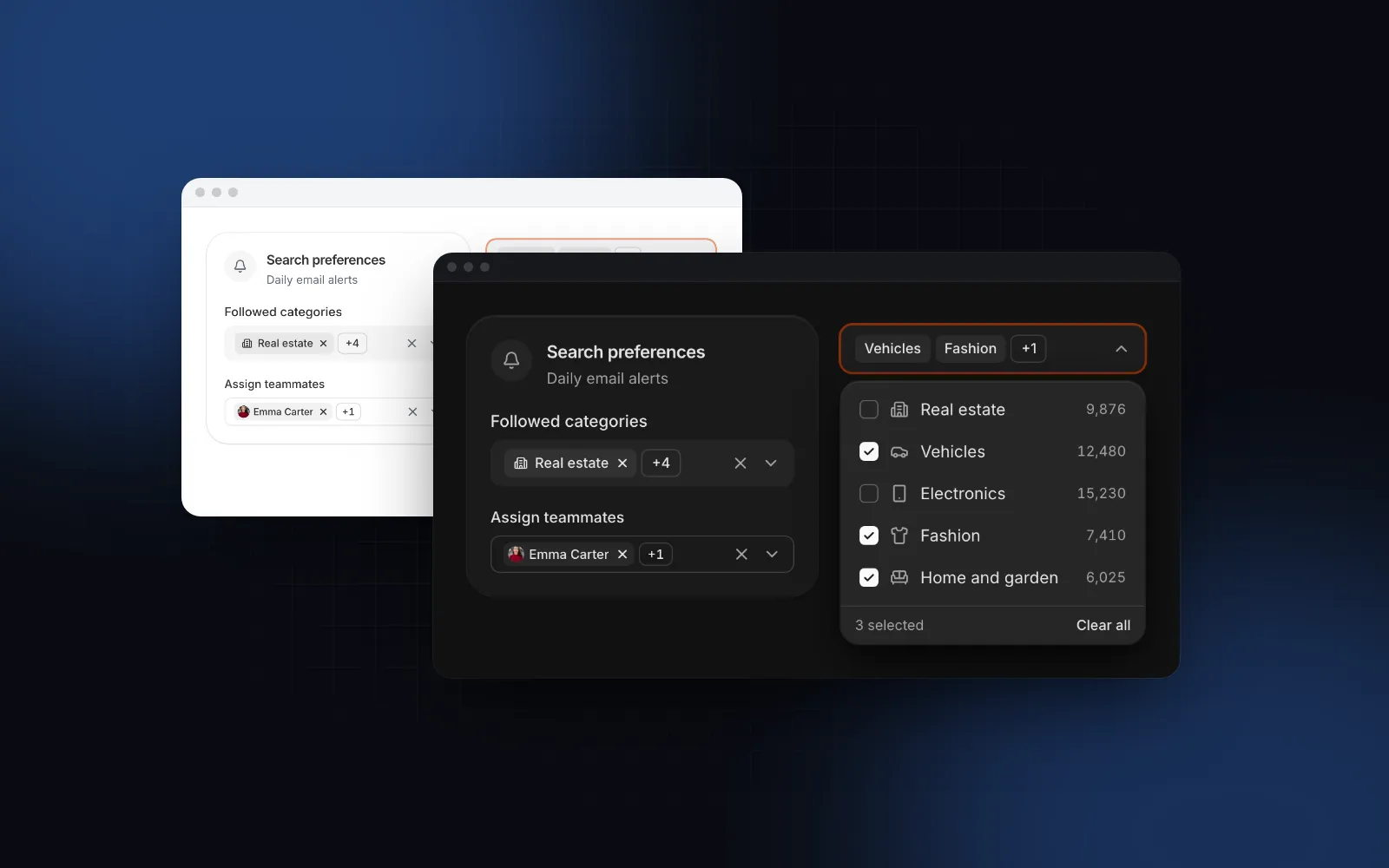
- Show picks as chips that fit. As many chips as fit on one line, then a "+N" chip, so the field keeps its height.
- Remove without opening. Each chip has its own x, and Backspace removes the last one.
- Search when the list is long. Short lists need no search box; long ones are unusable without it.
- Select all and a maximum. Select all for "every region", a limit for "up to 3 cities", both explained in the UI.
- Submit like a native field. The values reach
FormData,requiredblocks an empty submit, a form reset restores the default. - Work on a phone. Large rows, 16px text so iOS does not zoom, and a layer the thumb can reach.
Install the Multi Select and render it:
The option's icon shows in the row and inside its chip, which is how avatars end up next to names in an assignee picker. Options can also be groups: { label: "Vehicles", items: [...] }.
$ npx wingo-ui@latest add multi-selectHow do I show +N when multi select chips overflow?
Measure the chips: render every chip invisibly in a hidden layer, add their widths one by one, and stop at the last chip that fits while leaving room for the +N chip. The two shortcuts both break. Wrapping chips onto new lines makes the field grow and pushes the form down. A fixed count ("show 2, then +N") wastes space on a wide field and still overflows on a narrow one with long labels.
Measuring is what maxVisibleChips={0} (the default) does. A ResizeObserver watches the field and the hidden layer, so the count updates when the window resizes or a web font arrives late and widens the labels. At least one chip always shows, truncated if it has to be, so the field never reads as just "+5". The +N chip carries the hidden names in its title, so hovering it shows them.
When you want another trade-off, it is one prop:
display="count" suits filter bars, where the field is narrow and the picks matter less than the fact that a filter is on.
How do I add search and select all to a multi select?
Add search once the list passes eight options, select all when "every option" is a real choice, and a maximum when the product has a limit. With search="auto" (the default) the search row appears above eight options, or as soon as you pass loadOptions or creatable; "always" and "never" override it. Typing filters without caring about case or accents ("zurich" finds "Zürich"), matched letters turn bold, and Backspace in the empty search removes the last chip. For lists that live on a server, loadOptions receives the query after a 250ms debounce and an AbortSignal. The previous request is aborted, so an old response never overwrites a newer one:
The last 20 queries are cached, so typing back to an earlier query shows its results without a request. The component also remembers the label of every option it has seen, so picked values that are not in the current results keep their chips with real names. A search for "vin" does not turn the "negotiable" chip you picked earlier into a raw id.
selectAll adds a row on top. It toggles the visible options only: if someone searched for "new" and pressed Select all, they meant the matching rows. maxSelected={3} caps the picks, turns the unselected rows disabled at the limit, and the footer reads "2 of 3 selected". When both are on, Select all stops at the limit.
$ npx wingo-ui@latest add multi-selectHow do I make a multi select accessible?
Make the field a combobox that controls a listbox with aria-multiselectable, keep DOM focus out of the list, and announce the count. In the Multi Select, the field is a button with role="combobox", aria-haspopup="listbox", aria-expanded and aria-activedescendant pointing at the highlighted row, so a screen reader announces the row under the keyboard while focus stays on the field. When the search row is showing, focus moves into it and the search input carries aria-activedescendant instead, so arrows still move through the rows while you type. The field is labelled by its label plus the current summary, so it reads as "Followed categories, 3 selected". The footer count sits in a polite live region, so the new count is read after each toggle.
The keyboard model:
- Closed: Enter, Space or Arrow Down open the list, Arrow Up opens on the last row, Home and End open at either end, Backspace removes the last chip.
- Open: Arrow Up and Down move and wrap, Page Up and Page Down jump, Enter or Space toggle the highlighted row and keep the list open, Cmd or Ctrl+A selects all while the list (not the search) has focus, Escape or Alt+Arrow Up close and return focus to the field, Tab closes and moves on.
Chip x buttons stay out of the tab order on purpose. Tabbing through nine chips to reach the next field costs nine key presses; Backspace on the field removes the last chip in one. The x buttons still work for mouse and touch, with a larger hit area on coarse pointers.
How does a multi select work on a phone?
Below 768px the Multi Select opens a bottom sheet instead of the popover (responsive is on by default). The sheet is titled with the field's label, the rows are 48px tall with the checkbox at the start, and a sticky footer holds "Clear all" and "Done (3)". Picks in the sheet are a draft: Done commits them, while dragging the sheet down, tapping outside or Escape throws them away. That matches what people expect from a sheet, which is a step they can back out of.
The field itself grows from 40px to 44px on touch screens at the default md size, and its text is 16px on phones whatever the size, so iOS Safari does not zoom in when it opens. One touch detail is easy to miss: on a touch screen the search row does not take focus when the list opens, because the on-screen keyboard would cover half the rows the person came to tap. A tap on the search row raises it. Set search="always" when typing is the main way in, and the search gets focus right away. Our bottom sheet guide explains why a sheet beats a popover on small screens.
How do I use it with react-hook-form and zod?
Wrap it in Controller and validate the array. ref and onBlur land on the field's button, so react-hook-form can focus it when validation fails:
Without a form library, pass name and read the hidden inputs in a Server Action with formData.getAll("cities"). With required and name, an empty field blocks the submit like a native select and the browser's message points at the field. Validate on the server anyway: hidden inputs are as editable as any other.
Should I use a multi select, tag input, combobox or checkboxes?
Use a multi select for several values from a known list of about seven or more options; pick the others by where the values come from and how many there are:
Checkboxes in the page are the most scannable control when the list is short: no click to open, every option visible. CheckboxGroup from the Checkbox item takes options, selectAll and max as well, and it is free. The Tag Input is for open-ended values; our React tag input guide covers paste splitting and duplicates. The Combobox picks a single value by typing, which is the better fit for a city or a country.
Does shadcn have a multi select, and how do other libraries compare?
There is no shadcn multi select component by that name, but the shadcn Combobox takes multiple and renders chips with ComboboxChips. The details, as of October 2026, from each project's docs or source:
Sources: shadcn/ui Combobox (opens in a new tab), react-select source (opens in a new tab), MUI Autocomplete (opens in a new tab), react-multi-select-component (opens in a new tab).
One react-select default surprises people: hideSelectedOptions defaults to the value of isMulti, so picked options leave the menu and there is no checkbox list until you set it to false. That suits a typing-first tag field and confuses people scanning a list.
If your app already runs on MUI, the Autocomplete with multiple, limitTags and checkbox rows is the sensible choice. react-select fits a typing-first multi select when you are fine with Emotion styling, and react-multi-select-component is an MIT package with select all on by default. The shadcn Combobox is a good start when you only need chips. If you want measured overflow, select all over search results, a maximum and a phone sheet already built, that is what our Multi Select covers.
Where should you start?
Open the Multi Select docs: the playground and examples for avatars, a maximum, count and text displays, wrapping chips, groups with select all and async options. Multi Select, Tag Input and Combobox are part of Wingo UI Pro, $8 a month, $80 a year or $150 once as of October 2026 (pricing). For the rest of the form, read the React form components guide, and find more in the component guides category.
FAQ
How do I make a multi select dropdown in React?
Keep an array of selected values in state, render a button that opens a listbox with aria-multiselectable, and toggle a value on each row click without closing the list. A React multi select component such as Wingo UI's Multi Select adds chips with +N overflow, search, select all, a maximum, async options and a phone bottom sheet on top of that.
Does shadcn/ui have a multi select?
There is no component named Multi Select in shadcn/ui as of October 2026, but its Combobox takes a multiple prop and renders the picks as chips. Its docs show no select all row, no +N overflow and no phone drawer, so those need your own code or a community component.
How do I show +N more when multi select chips overflow?
Measure the chips in a hidden layer, add them one by one until the next chip plus the +N chip would pass the field's width, and render only those, then a chip with the remaining count. Re-measure with a ResizeObserver, because the field width and font loading both change the result.
Should select all pick every option or only the filtered ones?
Only the options the person can see. If they searched for "new" and press Select all, they expect the matching rows, not the 200 hidden ones. Wingo UI's Multi Select toggles the visible options and stops at maxSelected.
How do I submit a multi select with a form?
Render one hidden input per value with the same name and read them with formData.getAll(name), or wrap the component in react-hook-form's Controller and validate the array with zod. Wingo UI's Multi Select renders the hidden inputs when you pass name.
- Forms
- Multi Select
- Chips
- Accessibility
- Mobile UI