React Action Sheet: iOS-Style, Async and Responsive
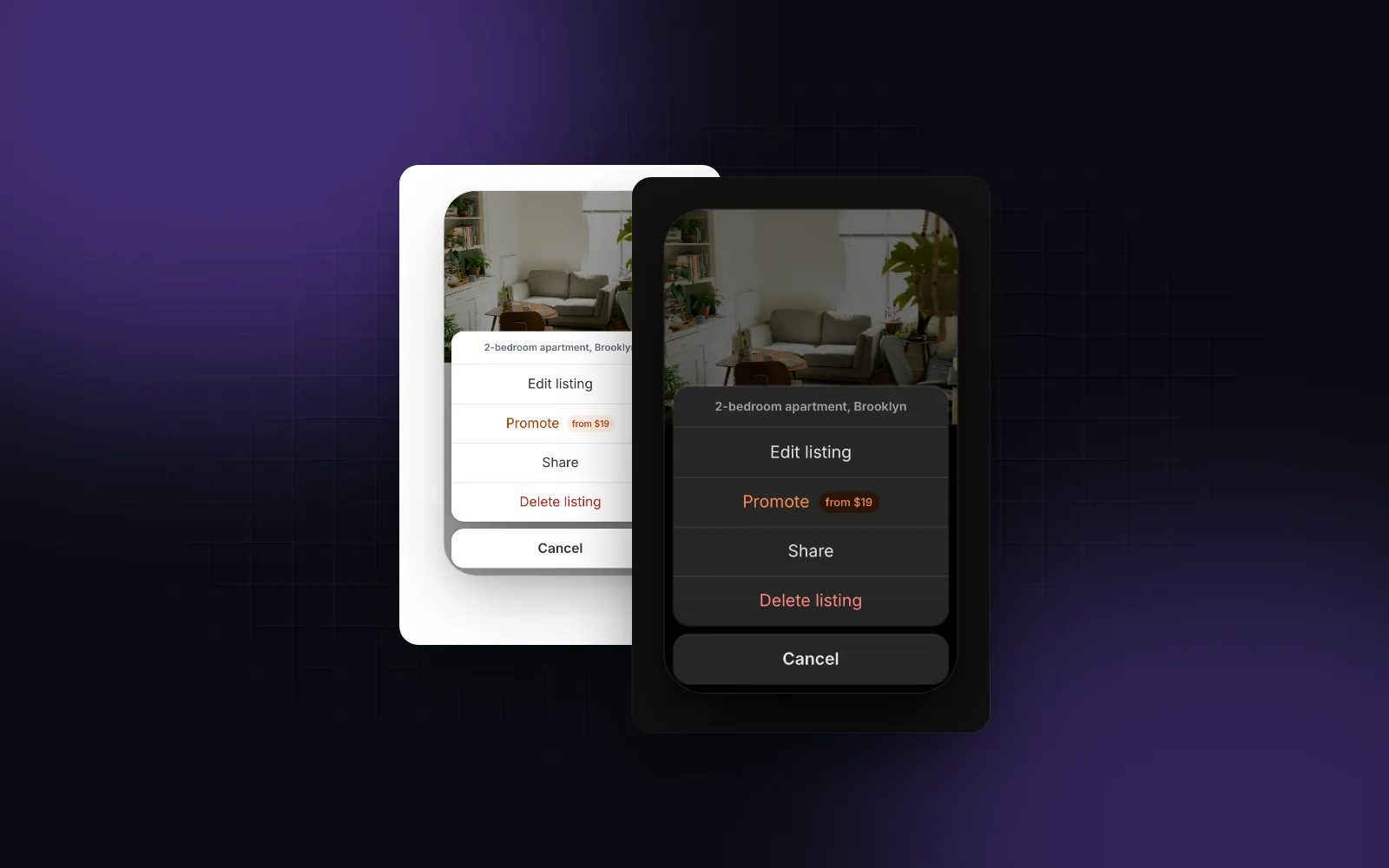
A React action sheet is what a phone user expects after tapping ⋯ on a photo, a message or a listing: the page dims, a short list of actions rises from the bottom, Delete is red, and Cancel sits apart where the thumb already is. Most web ports of the iOS action sheet get the slide-up right and stop there. They close before the delete request finishes, show nothing when the request fails, offer no keyboard path, and look like a stretched phone on a 1440px monitor. This guide covers what the pattern needs, then builds it with the Wingo UI Action Sheet, including an awaitable show() and the dialog or menu it becomes from 768px.
When should you use an action sheet instead of a menu or an alert?
Use an action sheet when the user just started something and has to choose how it ends, like closing a half-written email: delete the draft or save it. That is the example in Apple's action sheet guidelines (opens in a new tab) (checked October 2026), which also draw the line to its neighbors: an alert "is usually unexpected" and reports a problem, and people expect a menu to appear when they choose to reveal it. The same page asks for three things that shape every implementation:
- Destructive choices stand out. Use the destructive style and place those rows at the top, where they get noticed.
- Cancel goes at the bottom. It lets people reject an action that might destroy data.
- No scrolling. For iOS, Apple says to avoid letting an action sheet scroll: more buttons take longer to choose from, and scrolling invites a stray tap. The watchOS section adds a cap of four buttons including Cancel, a sensible budget on a phone too.
On the web, that becomes a mobile action menu within reach of one thumb, and something calmer on a desktop. Here is how the four related Wingo UI components divide the work:
What does the Action Sheet render on a phone?
On a phone it renders a bottom sheet in one of two styles. variant="ios" (the default) floats a card with the title, the message and 56px centered rows 8px above the home indicator, with Cancel in its own card underneath. variant="material" is one attached sheet with a handle, 48px rows with icons at the start, and Cancel as the last row. Both drag down to dismiss, because the phone sheet is the free Drawer, built on vaul.
Each row is an ActionSheetAction: { id, label, icon?, description?, tone?, disabled?, onSelect?, keepOpen?, badge? }, where tone is "neutral", "brand" or "danger". Here is a declarative react action sheet component on a listing card, with the destructive row first as Apple recommends:
trigger renders with asChild, so pass a single element that takes a ref, like a Button. Icons stay hidden in the iOS sheet unless you set showIcons, and they show by default in Material and on desktop. For several groups, pass groups (an array of action arrays) instead of actions: on iOS each group becomes its own card.
$ npx wingo-ui@latest add action-sheetHow does the sheet handle async and destructive actions?
If onSelect returns a promise, the row shows a spinner, the other rows dim, and the sheet refuses to close: Escape, a tap on the dimmed page and the drag all wait until the promise settles. When it resolves, onAction(id) fires and the sheet closes. When it rejects, the row shakes like a wrong passcode and stays ready for a retry. That is the difference between a sheet that says "Deleted" and one that only looks like it did.
The shake tells the user that something failed, not what. That is why the listing example calls toast.error() before it rethrows: the Toast says why, the shake says where, and the row is ready for a second tap. The toast needs a Toaster mounted once in your layout. Two props change the closing behavior: closeOnAction={false} keeps the sheet open after every action, and keepOpen: true on a single row does the same for that row only, which suits a toggle like "Mute notifications".
For destructive action confirmation, the sheet itself is often the right step. A title such as "Delete this listing?", a message under it, one red row and Cancel is a two-tap confirm that sits where the thumb is. When the first enabled action has the danger tone, the sheet puts keyboard focus on Cancel instead of on Delete, so pressing Enter right after it opens never destroys anything.
How do you await an action sheet with show()?
Call useActionSheet().show(options) from any event handler and await it: you get the chosen action's id back, or null. Mount ActionSheetProvider once near the root first. show() takes the same props as ActionSheet minus open, defaultOpen, onOpenChange and trigger, and resolves null when the user cancels or dismisses. It resolves after the chosen row's promise resolves, so the code after the await runs once the work is done. This mirrors Apple's Mail example, the draft you are closing:
defaults sits under every call's own options, which is where translated labels or a house variant go. A second show() replaces the open sheet and the first call resolves null. When the sheet closes, focus returns to whatever had it before the call, and useActionSheet() throws outside the provider so a missing provider fails loudly in development. A rejected row keeps the promise pending, since the user can still retry or cancel.
What does the action sheet look like on desktop?
Phones always get the sheet; at 768px and up, the desktop prop picks one of three layouts:
desktop="dialog"(the default): a compact 400px dialog with the same rows, start-aligned with icons.desktop="popover": a menu anchored to the trigger. It shows no Cancel, because menus close on Escape and outside clicks. Ashow()call has no trigger to hang from, so it falls back to the dialog.desktop="sheet": the phone sheet at every width, for kiosk or tablet-first screens.
Framework7 does something similar: its action sheet docs (opens in a new tab) list a convertToPopover option that turns the sheet into a popover on large screens. Ionic's ion-action-sheet (opens in a new tab) (@ionic/react 9.0.8, both checked October 2026) takes destructive and cancel button roles and always renders the cancel button last, but its docs describe no separate wide-screen layout, and present() resolves with nothing: you read the choice from the onDidDismiss result. If your actions are really a command menu with checkboxes, submenus and shortcuts, start from the Dropdown Menu instead: it is a floating menu on desktop and becomes an action sheet below 768px on its own.
$ npx wingo-ui@latest add dropdown-menuIs the action sheet accessible with a keyboard?
Yes, and it follows the same rules as a menu. Focus lands on the first action when it opens, or on Cancel when the first action is destructive. Up and Down move between the actions and Cancel, Home and End jump to the ends, Enter or Space runs the focused row, Tab cycles inside, and Escape cancels. The title labels the sheet; without one, labels.sheetTitle ("Actions" by default) becomes a hidden accessible title, and message becomes the description. With reduced motion, the phone sheet's slide is cut short, the desktop dialog only fades, and failed rows do not shake.
Which action sheet pitfalls show up on real phones?
Four show up as soon as the sheet meets real requests and real devices:
- Returning a promise you do not want to wait for. Every promise from
onSelectholds the sheet open.navigator.share()is the classic case: it settles only when the user finishes with the native share sheet, and rejects when they cancel it, which shakes your row. Call it withvoidor close first. - Too many rows. Every extra row is one more thing to read before the thumb moves, which is why Apple asks for a sheet that never scrolls. The sheet caps its list at
60dvhand scrolls inside its card with Cancel pinned, but a long list of people or folders belongs in a picker. Our guide to the React bottom sheet for the web covers sheets with real content. - The home indicator. A sheet glued to
bottom: 0puts Cancel under the iPhone's home bar. The iOS cards float above it and the Material sheet pads withenv(safe-area-inset-bottom); the safe area insets guide explains the CSS. - Using the sheet for irreversible, explained deletes. "Delete account and every invoice" deserves an Alert Dialog: a centered card where a tap on the dimmed page does nothing, focus starts on Cancel, and
await confirm()resolvestrueorfalse.
$ npx wingo-ui@latest add alert-dialogThe Action Sheet is one of the small details covered in our list of what makes a web app that feels native. For the whole mobile layer, from touch targets to bottom sheets, read the mobile-first React components guide or browse Mobile UI in React.
How do you install the Action Sheet?
Run npx wingo-ui@latest add action-sheet. It copies components/ui/action-sheet.tsx with the Button, Dialog, Drawer, Popover and Spinner it imports, the shared hooks, and their npm packages (motion, lucide-react, vaul and the Radix primitives). The Action Sheet is part of Wingo UI Pro, so sign in first with npx wingo-ui@latest login; the Drawer and Dropdown Menu it sits next to are free.
FAQ
What is an action sheet in React?
An action sheet is a modal list of choices tied to something the user just did, such as tapping a ⋯ button on a photo. It slides up from the bottom on a phone, shows destructive choices in red and ends with a Cancel button. In React it is a bottom sheet with a list of real buttons inside; the Wingo UI version builds its phone sheet on vaul through the Drawer.
What is the difference between an action sheet and a dropdown menu?
A dropdown menu is something people open on purpose to browse commands, and it can hold checkboxes, radio items and submenus. An action sheet offers a few choices about one action, with a title and a Cancel. On phones the Wingo UI Dropdown Menu already turns into an action sheet below 768px, so pick the Action Sheet when you want async rows, groups or an awaitable call.
Should I use an action sheet or an alert dialog to confirm a delete?
Apple's guidelines say to use an action sheet, not an alert, for choices related to an action the user started, and describe alerts as usually unexpected news about a problem. A sheet with one red row and Cancel is enough for most deletes; use an alert dialog when the delete cannot be undone and needs a sentence of explanation or a typed confirmation.
How many buttons should an action sheet have?
Few enough that the sheet never scrolls: Apple's iOS guidance says to avoid a scrolling action sheet, and its watchOS guidance caps it at four buttons including Cancel. When you pass more rows, the Wingo UI sheet caps its list at 60% of the dynamic viewport height and scrolls inside its card, with Cancel pinned below.
Is the Wingo UI Action Sheet free?
No. The Action Sheet and the Alert Dialog are Pro components. The Drawer, the Dialog, the Popover and the Dropdown Menu it is built from or sits next to are free.
- Mobile UI
- Action sheet
- React
- Accessibility
- iOS