Nextjs Cookie Consent: GDPR Banner and Consent Mode v2
You need a cookie banner before analytics can go live in the EU, and the quick version, one big Accept button next to a small "manage options" link, is the shape European regulators have flagged. This tutorial builds nextjs cookie consent that follows their guidance: Accept all and Reject all with equal weight, a settings panel with one switch per category, Google Consent Mode v2 values sent from the stored choice, and YouTube embeds that stay blocked until marketing cookies are allowed.
The code targets the App Router on Next.js 16, React 19 and Tailwind CSS v4. It uses the Cookie Consent component for the UI and the useConsent hook for the record behind it. Nothing here is legal advice: read the guidance of your own data protection authority, or ask a lawyer, for the details that apply to your site.
What does GDPR actually require from a cookie banner?
A banner must get consent before any non-essential cookie is set, make rejecting as easy as accepting, and let the visitor change their mind later. Two laws meet here. The ePrivacy Directive (Article 5(3)) says you need consent before you store or read anything on the visitor's device, unless it is strictly necessary for the service they asked for. GDPR defines what valid consent is: freely given, specific, informed, a clear positive action, and as easy to withdraw as to give.
The most practical reading of those rules for a UI developer is the EDPB cookie banner taskforce report (opens in a new tab), adopted on January 17, 2023 to coordinate how authorities handle the cookie banner complaints filed by noyb. It lists the patterns authorities agreed on:
- No reject button next to Accept. A vast majority of authorities considered a banner with no reject option on any layer that has an accept button an infringement.
- Pre-ticked boxes. Categories that start switched on in the settings layer do not produce valid consent.
- Reject hidden as a link. A "continue without accepting" link buried in the text, without enough visual support, does not count as a real choice.
- Deceptive contrast. A reject button whose text contrast is so low that it is unreadable could be manifestly misleading.
- "Essential" cookies that are not. Some sites label cookies "strictly necessary" that serve other purposes. The site owner has to keep the cookie list and be able to show why each one is essential.
- No way back. Visitors need an easy, always available way to withdraw, such as a link in a standard place or a small floating icon.
Turned into a spec for nextjs gdpr cookie consent, that gives six requirements: Accept all and Reject all side by side at the same size, every optional category off by default, a settings layer with per-category switches, nothing optional loaded before the choice, a footer link that reopens the settings, and a record of what was chosen and when.
How do you add a cookie consent banner to Next.js?
Install the Cookie Consent component and render it once in the root layout, next to a footer link that reopens the settings. The CLI also pulls in the useConsent hook and the items the banner builds on, such as Button, Switch, Dialog and Collapsible:
Then add it to the root layout, after the page content:
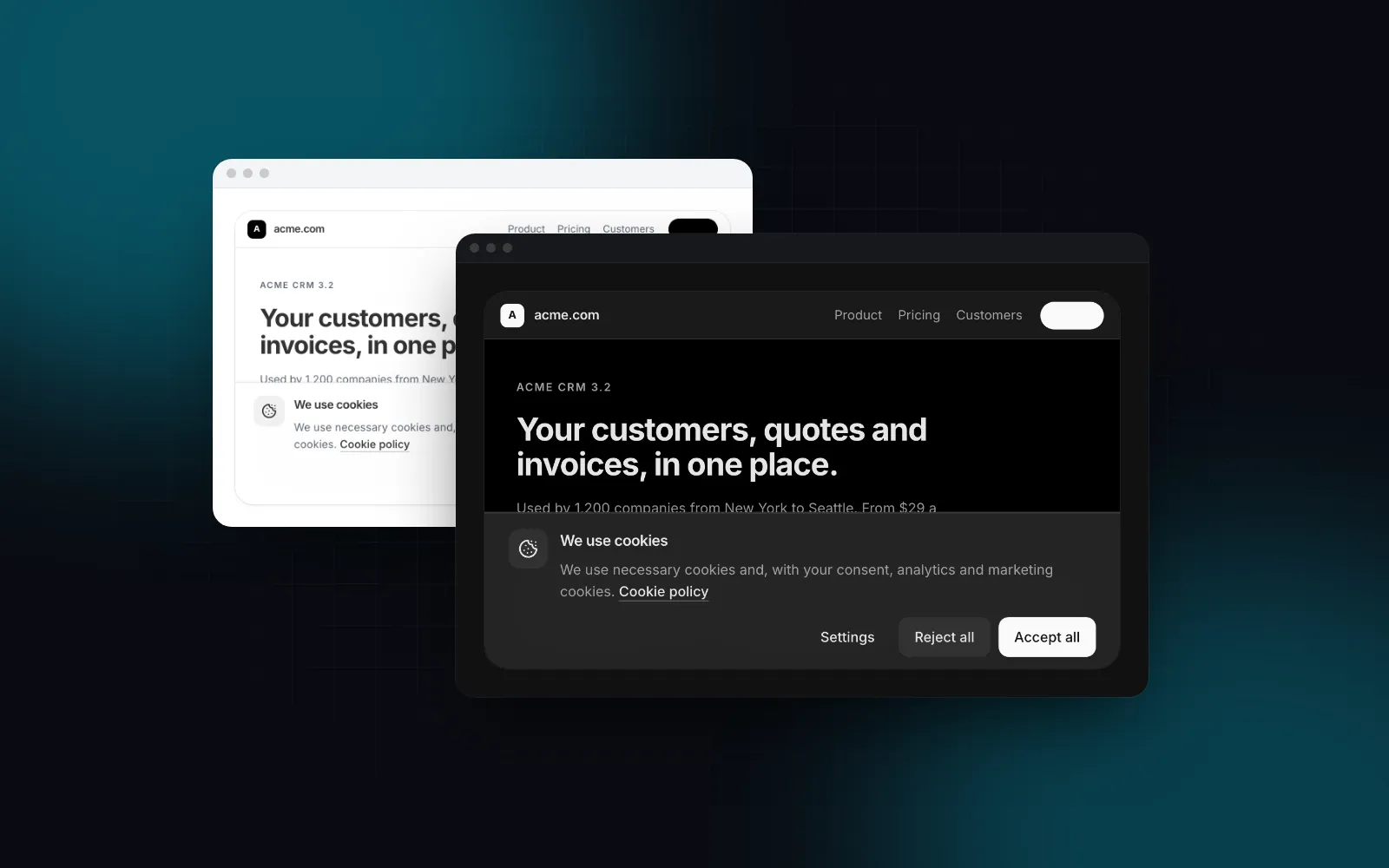
That is a complete nextjs cookie banner. Here is what it does without extra props:
- It shows only for visitors who have not decided. The record lives in a
ui-consentcookie for 180 days (maxAgeDays), and the bar renders after hydration, so a visitor who already chose never sees it flash. - Accept all, Reject all and Settings are equal buttons.
tonecolors only the Accept button; Reject keeps a neutral soft look at the same size. On a phone they stack as three full-width 48px buttons. - The bar is fixed to the bottom edge, so it never shifts the layout. It writes its visible height to
--cookie-consent-offseton<html>, which is how the footer above keeps its link reachable while the bar is open. - Settings opens a dialog on desktop and a full-height bottom sheet below 768px. Strictly necessary is locked on; the other switches start off.
- Every choice is announced to screen readers through a polite live region.
CookieSettingsLink calls openConsentSettings(), so the settings open from the footer of any page. That covers the "easy to withdraw" requirement with a link in a predictable place.
$ npx wingo-ui@latest add cookie-consentThe root layout is a server component, so you cannot pass onDecide from it: functions do not cross the server to client boundary. The next section reads the choice from a small client component instead.
How do you build a React cookie consent banner with per-category switches?
Pass a categories list that matches what your site really sets: the settings panel renders one switch per entry and a "Show cookies" toggle that lists each cookie's name, provider, duration and purpose. The default list is Strictly necessary, Preferences, Analytics and Marketing. Keep your own list in a plain data file:
List the cookies your own audit finds; the ones above are examples. Write the array out instead of mapping over DEFAULT_CONSENT_CATEGORY_CONFIG: the layout is a server component, and in a server file every export of a "use client" module is a client reference. You can pass a reference through as a prop, but DEFAULT_CONSENT_CATEGORY_CONFIG.map(...) throws "You cannot dot into a client module from a server component" when the layout renders. The import type above is erased at build time, so it is safe.
Then pass the list and the version to the banner:
version is the policy version. When you add a category or a new vendor, raise it: records saved under another version count as undecided, so the bar comes back and asks again. Use the same constant everywhere you read consent, because useConsent, ConsentGate and the banner each take version and only agree when it matches.
A few props worth knowing for a React cookie consent banner:
The full list, with the playground for each, is on the cookie consent docs page. The switches in the settings panel are the same Switch the rest of the library uses, and the panel is a Dialog that turns into a sheet on phones.
How do you set up Google Consent Mode v2 in Next.js?
Set every consent signal to denied in an inline script that runs before any Google tag, then send an update from the stored choice. Google's consent mode developer guide (opens in a new tab) (last updated October 13, 2026, checked October 16, 2026) lists ad_storage and analytics_storage plus the two parameters consent mode v2 added, ad_user_data and ad_personalization. The gtag('consent', 'default', ...) call must come before any command that sends measurement data, such as config or event; the guide warns that defaults do not work when the consent code runs out of order.
Google's consent mode overview (opens in a new tab) (last updated July 30, 2026, checked October 16, 2026) describes two setups. In basic consent mode, Google tags do not load until the visitor interacts with the banner, and stay blocked without consent. In advanced consent mode, the tags load on page open and send measurements without cookies while consent is denied. Basic is the stricter reading of "nothing optional before the choice", so the google consent mode v2 nextjs setup below uses it.
Step 1: set the defaults before anything else
An inline next/script with strategy="beforeInteractive" is written into the initial HTML, and the Next.js bootstrap runs it before hydration, so it always runs before any client component. The Next.js docs require this strategy to live in the root layout, and an inline script needs an id. Because it runs as a classic script, function gtag() becomes a global that window.gtag can call later:
The script goes into the body of the root layout. Step 2 below fills in GoogleTag; this is the final layout:
Step 2: send the update and load the tag from the stored choice
toGoogleConsentMode(choices) from the hook maps the categories to Consent Mode values: analytics to analytics_storage, marketing to the three ad signals, preferences to functionality and personalization, and security_storage always granted. A small client component sends the update every time the choice changes and loads gtag.js only once analytics or marketing is allowed:
With <GoogleTag /> in the layout next to the banner, the order is fixed. Because the commands go through the dataLayer queue, gtag.js processes them in order when it arrives: denied defaults, the visitor's real values, then the config. A returning visitor who accepted gets the update on the first render after hydration, with no banner.
choices is memoized from the stored record, so the effect runs once on load and again after each decision. When a visitor withdraws, the same effect sends denied and the tag stops using its cookies. Cookies it already set stay in the browser until they expire; if your policy promises to remove them, clear them in an onConsentChange listener from the hook.
If you choose advanced consent mode instead, load gtag.js unconditionally and add wait_for_update: 500 to the defaults. Google's guide uses that parameter to give a banner that loads asynchronously a number of milliseconds to send its update before tags send data.
How do you block YouTube embeds until consent is given?
Wrap the iframe in ConsentGate, so it is not in the HTML until marketing is allowed. An embedded player is a third-party page that can read and write its own storage as soon as it loads, and Article 5(3) covers any storage access, not only cookies, so treat the embed as marketing even on youtube-nocookie.com unless your own audit says otherwise. ConsentGate renders its children only when the category is on, renders nothing during hydration, and otherwise shows a placeholder with an "Allow and load" button that turns that one category on:
The page stays a server component; only the gate is a client component, and the iframe passes through as children. The placeholder names the category from your config ("This content uses marketing cookies") and explains that the visitor can change it later in the cookie settings. Pass fallback for your own placeholder, such as a thumbnail with a play button.
For your own components, the hook gives you the same check. has("marketing") is true only after a decision that allowed it, and save({ ...choices, marketing: true }) turns one category on without touching the others.
$ npx wingo-ui@latest add use-consentWhat does the stored consent record look like?
The record is a small JSON object with the policy version, the choices, an ISO timestamp and the method, which is what you need to show that consent was given (GDPR Article 7(1)). The hook stores one record per site, readable as record from useConsent or with getConsent() outside React:
method is accept-all, reject-all or custom. If you need a server-side log, send the record to your API in an onConsentChange listener; the cookie itself only proves what this browser holds.
Because the default storage is a cookie, server code can read the same record. Next.js already URL-decodes cookie values, so JSON.parse is enough. Compare the version yourself, the way the hook does:
Calling cookies() makes the route dynamic, so use this in a route handler or a page that is dynamic anyway, not in the root layout of a static site.
Pitfalls to check before you ship:
- Rendering the banner on the server. A static page cannot know the choice, so a server-rendered banner flashes for everyone who already decided. Gate it on
hydrated; the component does. The next-themes hydration error post explains the same mismatch for themes. - Loading analytics in the layout "for now". A plain
<Script src=".../gtag/js">in the layout runs before any choice. Load it from the consent state instead. - Forgetting the phone. A settings dialog with four categories and cookie tables does not fit a 390px screen, which is why the panel becomes a bottom sheet below 768px. The responsive dialog post covers that pattern.
- Mismatched versions. If the banner uses version 2 and
GoogleTaguses the default 1, the tag reads the visitor as undecided. Keep one constant. - Function props from the layout.
onDecideand the function labels (showCookies,gateTitle) cannot cross from a server layout. Override only the string labels there, or wrap the banner in a small client component that owns the functions.
What should you do next?
Install the banner with npx wingo-ui@latest add cookie-consent, add the defaults script and the GoogleTag component, and wrap every third-party embed in ConsentGate. Both the component and the hook are part of Wingo UI Pro; the pricing page lists what each plan includes. More App Router and Tailwind v4 guides live in Next.js and Tailwind CSS, starting with the Tailwind v4 design tokens guide that the banner's colors come from.
FAQ
Does a cookie banner need a Reject all button?
In the EU, regulators treat a missing reject option on the layer that has the accept button as a problem. The EDPB cookie banner taskforce report of January 17, 2023 says a vast majority of authorities considered it an infringement, so put Reject all next to Accept all at the same size.
How do I set up Google Consent Mode v2 in Next.js?
Put an inline next/script with strategy beforeInteractive in app/layout.tsx that defines gtag and calls gtag('consent', 'default', ...) with ad_storage, ad_user_data, ad_personalization and analytics_storage set to denied. Then call gtag('consent', 'update', ...) from a client component as soon as the visitor decides, and on every later visit once the stored choice is read.
Can I store cookie consent in localStorage instead of a cookie?
Yes: useConsent and CookieConsent accept storage local or session. The default cookie has two advantages: server code can read it with cookies() from next/headers, and it expires on its own, so the visitor is asked again after maxAgeDays (180 by default).
Why does my cookie banner flash for visitors who already chose?
A static page cannot know the stored choice, so a banner rendered on the server shows for everyone until the client reads storage. Render the banner only after hydration and only while the visitor is undecided, which is what the hydrated flag of useConsent is for.
Are strictly necessary cookies exempt from consent?
Cookies that the service needs to work, such as a session cookie or the cookie that stores the consent choice itself, do not need consent under the ePrivacy rules. Labeling analytics or ad cookies as essential does not make them exempt, and the EDPB taskforce report lists misclassified essential cookies among the practices authorities reviewed.
- Next.js
- GDPR
- Cookie consent
- Google Consent Mode
- Privacy
- App Router